

Many years focused on one thing shows. ValidVCE's study of the Microsoft Troubleshooting Microsoft Exchange Online runs deep — 107 practice questions for the MS-220 exam, with information updated daily.
Microsoft MS-220 Exam Overview:
| Certification Vendor: | Microsoft |
|---|---|
| Exam Name: | Troubleshooting Microsoft Exchange Online |
| Exam Number: | MS-220 |
| Exam Duration: | 120 minutes |
| Related Certifications: | Microsoft 365 Certified: Exchange Online Support Engineer Specialty |
| Real Exam Qty: | 40-60 |
| Exam Price: | USD 165 |
| Passing Score: | 700/1000 |
| Exam Format: | Multiple response, Scenario-based questions, Multiple choice, Case study |
| Certificate Validity Period: | 1 year (Microsoft role-based certification renewal policy) |
| Available Languages: | Chinese (Simplified), Portuguese (Brazilian), French, Korean, Japanese, German, Spanish, English |
| Sample Questions: |  |
| Exam Way: | Online proctored or authorized Pearson VUE test center |
| Pre Condition: | No mandatory prerequisite exam. Strong experience with Exchange Online, hybrid environments, PowerShell, and Microsoft 365 administration is recommended. |
| Official Syllabus URL: | https://learn.microsoft.com/en-us/credentials/certifications/resources/study-guides/ms-220 |
Microsoft MS-220 Exam Syllabus Topics:
| Section | Weight | Objectives |
|---|---|---|
| Troubleshoot Mail Flow Issues | 20-25% | - Troubleshoot Mail Flow Issues with External Systems
|
| Troubleshoot Compliance and Retention Issues | 25-30% | - Troubleshoot Compliance Issues
|
| Troubleshoot Hybrid and Migration Issues | 10-15% | - Troubleshoot Migration Issues
|
| Troubleshoot Exchange Online Configuration Issues | 15-20% | - Troubleshoot Recipient Issues
|
| Troubleshoot Mail Client Issues | 20-25% | - Troubleshoot Calendaring Issues
|
Microsoft Troubleshooting Microsoft Exchange Online Exam FAQ — Complete Answers
The Microsoft Troubleshooting Microsoft Exchange Online blueprint spans 5 domains — including Troubleshoot Mail Flow Issues (20-25%), Troubleshoot Hybrid and Migration Issues (10-15%), Troubleshoot Compliance and Retention Issues (25-30%). Weightings show where the exam concentrates; the full outline above covers every subtopic.
USD 165 per attempt, 700/1000 to pass. Every retake bills the full fee, so make practice thorough first — the 107 practice questions for the MS-220 exam at ValidVCE are the affordable rehearsal.
Delivery is instant — an automatic email within a minute of payment, unlimited installations, and 24/7 customer assisting for downloading or purchasing problems if nothing arrives within 2 hours. If you fail the corresponding MS-220 exam within 60 days of purchase, pick your remedy: a full refund (email a scanned enrollment slip plus the official Score Report PDF within 2 days of the exam; after confirmation, processed within 7 days), waiting for the next updated version free, or a free change to two other equal-value dumps. Excluded: exams within 3 days of purchase, candidate names that don't match the payer, and free or expired products.
The Microsoft Troubleshooting Microsoft Exchange Online is Microsoft's certification exam for Microsoft 365, at the Associate level. It demonstrates verified, job-relevant capability to employers. Related credentials include Microsoft 365 Certified: Exchange Online Support Engineer Specialty.
120 minutes for 40-60 questions. Rehearse the format interactively: the ValidVCE online engine recreates the test atmosphere, so pacing is trained before it counts.
Yes — a free Microsoft Troubleshooting Microsoft Exchange Online demo is available to download on our exam page. Evaluate the material yourself; purchases include 365 days of free updates, emailed immediately upon release, renewable at 50% off afterward.
No mandatory prerequisite exam. Strong experience with Exchange Online, hybrid environments, PowerShell, and Microsoft 365 administration is recommended. Eligibility rules change from time to time, so confirm the current requirements on the official page (official MS-220 exam page) before booking.
Microsoft Troubleshooting Microsoft Exchange Online Sample Questions:
A company uses a Microsoft Exchange Server 2019 hybrid environment. The company is migrating mailboxes to Exchange Online.
You notice that the migration activity for larger mailboxes is slow. You review the migration logs and observe multiple instances of the following message:
You need to troubleshoot the issue.
What is the reason for the slow migrations?
- A. The disk latency on the Exchange Server is too high.
- B. The replay queue of the transactions logs is too large.
- C. There is a temporary interruption in the content indexing operations.
- D. The CPU utilization on the Exchange Server is too high.
Correct Answer: B 🗳️
A company uses Exchange Online.
Users report issues synchronizing their mobile devices with Exchange.
You need to troubleshoot the issue.
Which cmdlet should you run?
- A. Get-ActiveSyncDeviceClass
- B. Get-ActiveSyncDevice
- C. Get-MobileDeviceStatistics
- D. Get-MobileDeviceMailboxPolicy
Correct Answer: C 🗳️
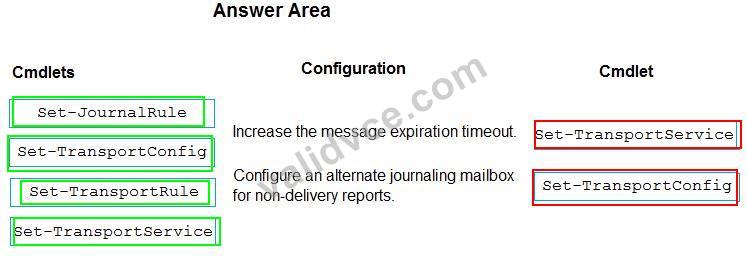
A company uses Microsoft Exchange Server 2019. The company enabled journaling for all users.
Some emails are not being journaled because the journaling mailbox is not available.
You need to resolve the issue.
Which cmdlets should you run? To answer, drag the appropriate cmdlets to the correct configurations. Each cmdlet may be used once, more than once, or not at all. You may need to drag the split bar between panes or scroll to view content.
NOTE: Each correct selection is worth one point.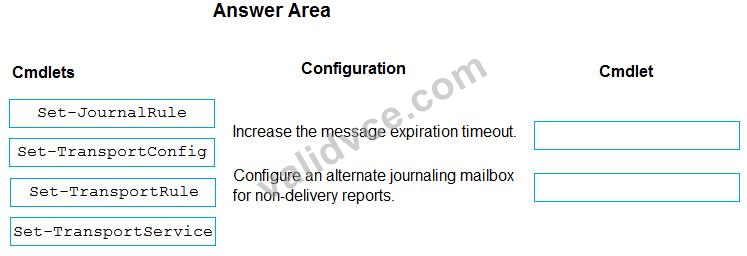
Correct Answer:
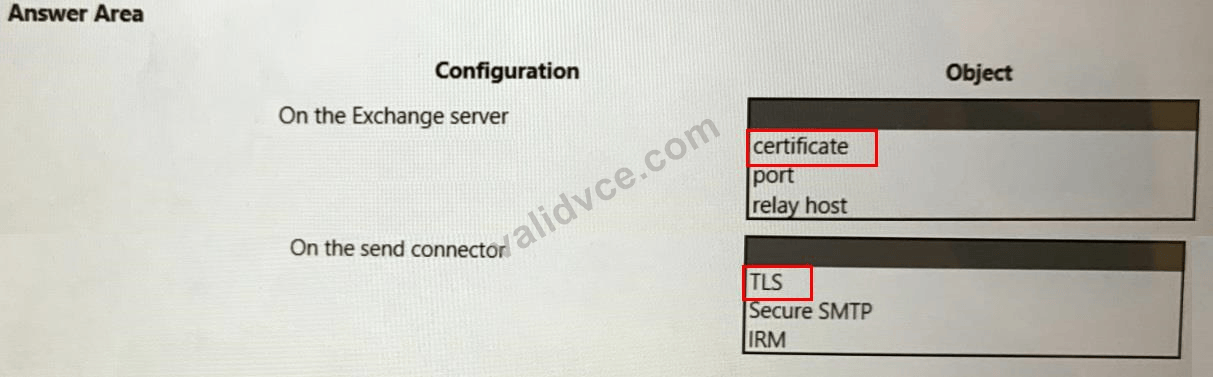
You need to configure email for Trey Research.
What should you configure? To answer, select the appropriate options in the answer are a. NOTE: Each correct selection is worth one point.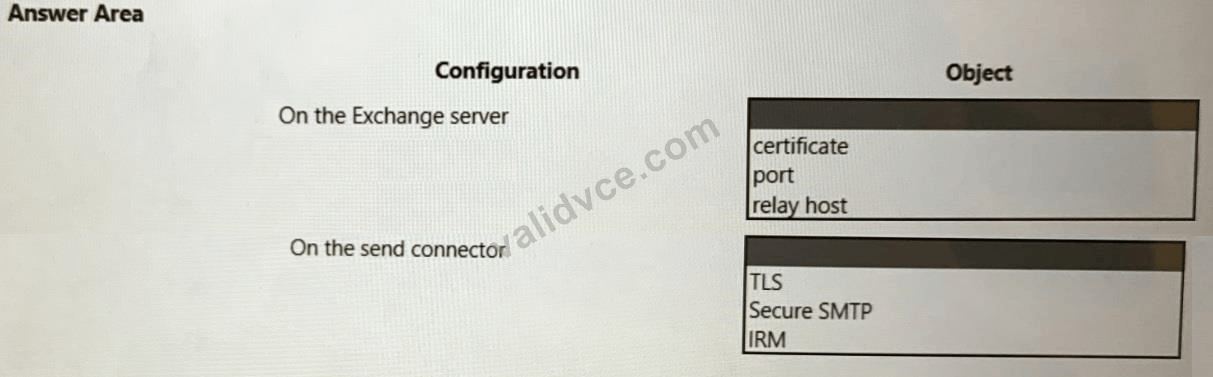
Correct Answer:
Topic 1, Contoso, Ltd
Deployment
* Contoso uses a Microsoft Exchange Server hybrid deployment. The company recently upgraded the Exchange Server environment from Exchange Server 2013 to Exchange Server 2016.
* The existing deployment uses a Microsoft 365 Enterprise E3 subscription.
* Email messages that Contoso, Ltd. sends to Fabrikam, Inc. and Trey Research use send connectors that are deployed on the Exchange server.
Mailbox locations
* Mailboxes for users in the corporate environment are hosted on Exchange Server 2016 servers.
* Mailboxes for members of the sales and marketing teams are hosted in Exchange Online.
Backup and retention
* Exchange data is backed up every night. Backups are stored in a Microsoft Azure storage account.
* The mailbox retention period for mailboxes is 60 days.
* The company has a retention policy that moves all email from the inbox of executives to an archive mailbox.
Identity and authentication
* The company configures Azure Active Directory (Azure AD) Connect by using express settings.
* The Active Directory root domain is Contoso.com. There is another Active Directory (AD) tree named Tailspin.com.
* The Azure AD tenant name is contoso.onmicrosoft.com.
* Contoso.com is a verified custom domain in Azure AD.
* Contoso adds the primary contacts for each of their client companies as external recipients in Azure AD.
* The company uses self-signed certificates on all Exchange servers.
Policies
The Exchange server uses a custom email address policy for all recipients of smtp:Xg.Xsgcontoso.com.
Authentication
Fabrikam, Inc. and Trey Research require that all inbound email must originate from an independently authenticated source. All synchronized Azure AD accounts must correspond to an existing AD account. You must remove any accounts from Azure AD that cannot be synchronized.
Retention
* On-premises mailboxes must apply retention policies that the company configures in Exchange Online.
* Audit logs must be retained for five years.
* All new mailboxes must be configured to move mail from the inbox that are older than 60 days to an archive in Exchange Online.
* Members of the compliance team must be able to retain email indefinitely. This must apply to inactive mailboxes of the compliance team.
* All email sent between members of the executive team must be encrypted with S/MIME.
* Administrative operations on mailboxes for members of the executive team must be audited. This includes audits for operations that move email.
* All deleted messages must be completely removed from mailboxes 180 days after deletion for items not covered by a retention policy.
Sharing
* Users must be able to share calendar information with any other user in the organization.
* Users must be able to share only free/busy information with external recipients. The information must not include the name or location for meetings.
Outgoing email
All email sent to external recipients must display a corporate disclaimer. Incoming email
* All email attachments from external senders must be manually inspected by a moderator if they are unrecognized by Exchange Online. The moderator email address is [email protected].
* Recipients must be able to receive unrecognized email attachments from Fabrikam, Inc. senders.
Hosting
All public folder content must be stored on the Exchange Server.
Team issues
Accounting team
Accounting team users report that they cannot send emails to mail-enabled public folders. Sales team Sales team users report that they cannot send emails to mail-enabled public folders. Marketing team
* A marketing team user named User1 is deleted. The user is rehired 45 days later in the same position and department. An administrator restores the User1 account. User1 reports that they cannot access their previous email.
* Corporate users are attempting to schedule meetings with marketing team members. When users attempt to add members of the marketing department, they are unable to view when they are available.
Executive team
* A user named Excel is unable to send an S/MIME encrypted email to a user named Exec2.
* Email messages in the executive team mailboxes that are larger than 5 MB are not moved to their archive mailbox.
* Audit logs for Executive mailboxes are being deleted after 90 days.
Other issues
Retention policies
* The default retention policies are not being applied to new mailboxes that the company creates in the on-premises environment.
* The system deletes audit logs for executive mailboxes after 90 days. Audit logs do not record operations for email that is moved.
* Members of the compliance team report they are unable to retain messages for more than 60 days.
Microsoft Outlook
* Users with accounts in the Tailspin AD tree report Outlook is not set up automatically.
* Contoso users report that Outlook takes a long time to reconnect to Exchange after a computer resumes from hibernation.
Compliance
Users report that they can view items older than 180 days in the Recoverable items folder. Email to and from external partners
* A Fabrikam, Inc. administrator reports that a disclaimer is not appended to email received from Contoso, Ltd.
* A user named User2 reports receiving an email attachment that is not recognized by Exchange Online from an external sender.
Azure AD
A user named Admin 1 reports issues synchronizing accounts to Azure AD.
Calendar sharing
Users are unable to share calendar information with external recipients.
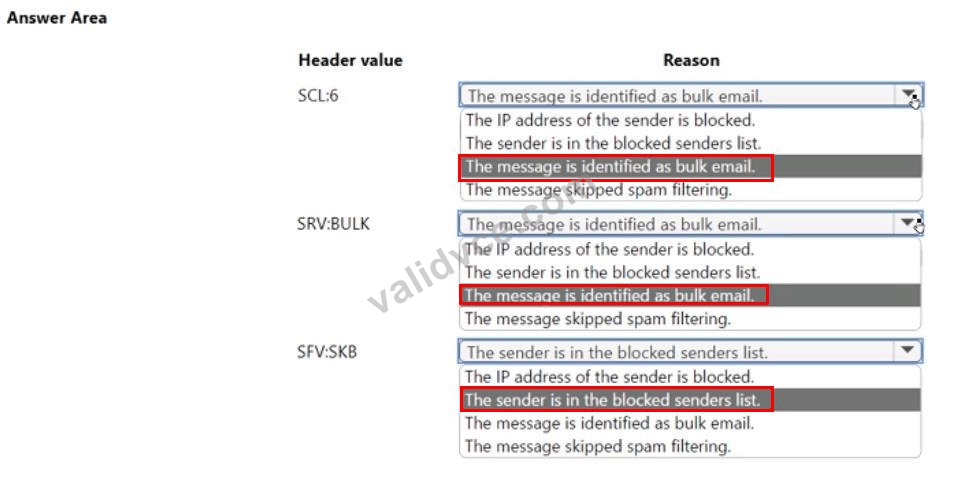
A company uses Exchange Online. The company enables default spam filtering settings.
Users report that emails are delivered to their Junk Email folder instead of their inbox.
You need to determine why the emails are being moved to the Junk Email folder. You review the message headers for the affected emails.
What should you conclude? To answer, select the appropriate options in the answer area.
NOTE: Each correct selection is worth one point.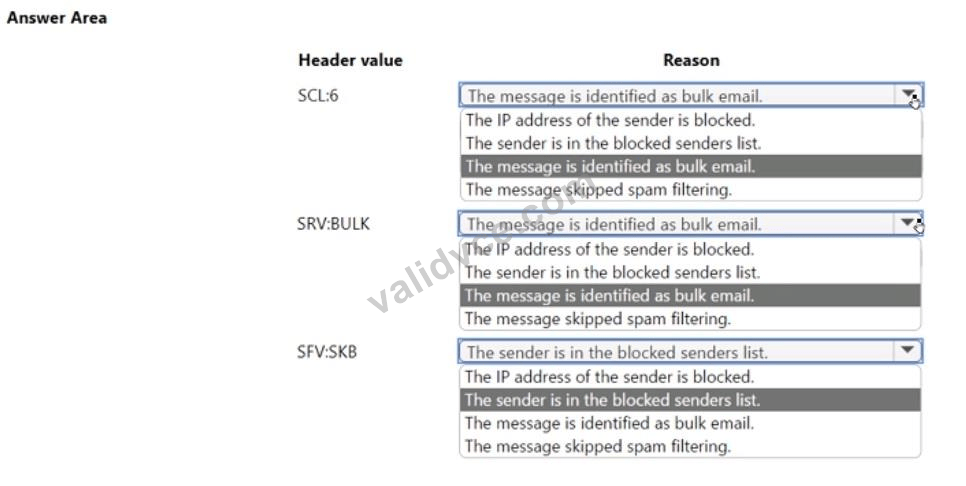
Correct Answer:


 1185 Customer Reviews


