

Failing the Citrix Deploying Citrix XenDesktop 7.6 Solutions (1Y0-301日本語版) exam in 2026 does not just cost time — it means paying the full registration fee a second time. Drilling the 112 practice questions from ValidVCE before you sit the 1Y0-301日本語 exam is the cheapest insurance available.
Citrix 1Y0-301日本語 Exam Overview:
| Certification Vendor: | Citrix |
|---|---|
| Exam Name: | Deploying Citrix XenDesktop 7.6 Solutions |
| Exam Number: | 1Y0-301 |
| Available Languages: | Japanese, English |
| Certificate Validity Period: | 3 years |
| Exam Price: | $200 USD |
| Real Exam Qty: | 65-72 |
| Exam Format: | Simulation, Multiple Response, Multiple Choice |
| Exam Duration: | 75-90 |
| Related Certifications: | CCE-V (Citrix Certified Expert – Virtualization) |
| Passing Score: | 67%-70% |
| Recommended Training: | Citrix Documentation for XenDesktop 7.6 Citrix XenDesktop 7.6 Deployment Course |
| Exam Registration: | Citrix Certification Portal Pearson VUE Registration |
| Sample Questions: |  |
| Exam Way: | Onsite at Pearson VUE test centers; Online proctored exam available |
| Pre Condition: | Recommended: Hands-on experience with XenDesktop 7.6, basic knowledge of Windows Server, Active Directory, virtualization platforms (VMware, Hyper-V, XenServer) and networking |
| Official Syllabus URL: | https://training.citrix.com/ |
Citrix 1Y0-301日本語 Exam Syllabus Topics:
| Section | Weight | Objectives |
|---|---|---|
| Topic 1: Installing Required Technologies | 22% | - Delivery Controller installation and configuration - License Server installation and activation - StoreFront installation and initial setup - SQL Server database setup and licensing - Virtual Delivery Agent (VDA) installation |
| Topic 2: Configuring Technical Components | 30% | - Provisioning Services and Machine Creation Services - Policies, zones and high availability - Authentication, certificates and secure access - Creating and managing Machine Catalogs - Configuring Delivery Groups and applications |
| Topic 3: Pre-installation Considerations | 18% | - Hardware, software and hypervisor requirements - Architecture and components overview - Network, storage and database planning - Service accounts, permissions and security planning |
| Topic 4: Advanced Configuration and Optimization | 10% | - Performance tuning and security hardening - Multi-site and zone configuration - Load balancing and scalability |
| Topic 5: Testing and Maintaining Configurations | 20% | - Backup, restore and disaster recovery - Validating site functionality - Monitoring and logging - Basic troubleshooting and optimization |
Citrix 1Y0-301日本語 Exam — Your Questions, Answered
The 1Y0-301日本語 exam, officially titled Deploying Citrix XenDesktop 7.6 Solutions (1Y0-301日本語版), is the Citrix exam you pass to earn the CCP-V (Citrix Certified Professional – Virtualization) certification, a credential at the Professional level. Passing it confirms the skills defined in the official exam outline, and it is associated with related credentials such as CCE-V (Citrix Certified Expert – Virtualization).
The 1Y0-301日本語 exam includes 65-72 questions and gives you 75-90 to finish them. That is a tight pace per question, so get used to reading each stem once, flagging anything uncertain, and moving on rather than getting stuck. Running timed practice tests in the ValidVCE desktop or online test engine is the most reliable way to build that rhythm before exam day.
The passing score for the 1Y0-301日本語 exam is 67%-70%, and the official registration fee is $200 USD. Keep in mind that a failed attempt means paying $200 USD again in full to retake it, so book your slot only when your scores on ValidVCE practice tests sit consistently above the passing line.
Citrix lists the following prerequisites or eligibility notes for the 1Y0-301日本語 exam: Recommended: Hands-on experience with XenDesktop 7.6, basic knowledge of Windows Server, Active Directory, virtualization platforms (VMware, Hyper-V, XenServer) and networking. Requirements can change over time, so confirm the details on the official exam page at Citrix's official site before you register.
You can register for the 1Y0-301日本語 exam through the official channels below:
The exam is delivered in the following format: Onsite at Pearson VUE test centers; Online proctored exam available. Choose a date that leaves you enough time to work through the full 112-question practice set first.
Citrix recommends the following training resources for 1Y0-301日本語 candidates:
Official courses build the theory, and the 112 practice questions from ValidVCE help you turn that theory into exam-ready speed and accuracy.
Yes. ValidVCE offers a free PDF demo of the 1Y0-301日本語 material, so you can check the question style and answer quality before purchasing. Every purchase also includes 365 days of free updates, and if your product expires you can extend the update service at a 50% discount from your member zone.
Your purchase is protected by a 100% Money Back Guarantee with clear conditions: if you take the corresponding 1Y0-301日本語 exam within 60 days of purchase and do not pass, you can apply for a full refund. The candidate name must match the payer name, and you need to submit a scanned exam enrollment slip together with the official Score Report PDF within 2 days of taking the exam; claims are processed within 7 days. Sitting the exam within 3 days of purchase, downloading without taking the exam, free materials, and expired orders are not covered. If you would rather not take a refund, you can exchange your order for two free exam products of equal value and keep the update service on your original purchase.
Delivery is instant: your download links are emailed within one minute of payment, and you can also download directly from the website. If nothing arrives within 2 hours, contact customer service and check your spam folder. There is no limit on how many computers you can install the material on.
The 1Y0-301日本語 exam blueprint is divided into 5 domains, starting with Testing and Maintaining Configurations (20%); Installing Required Technologies (22%); Configuring Technical Components (30%). For the complete domain-by-domain breakdown, see the Exam Topics section above — it lists every topic the current outline covers.
Citrix Deploying Citrix XenDesktop 7.6 Solutions (1Y0-301日本語版) Sample Questions:

SIMULATION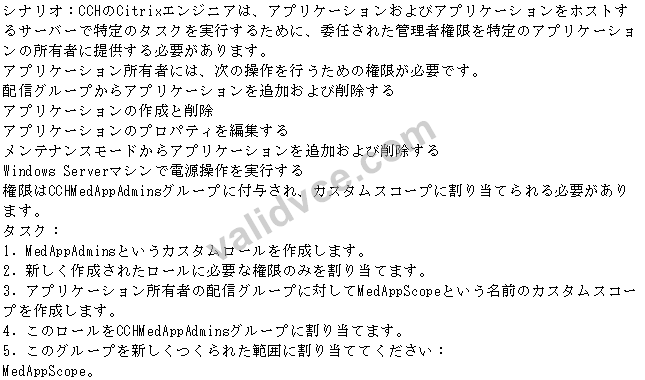

Correct Answer:

Explanation: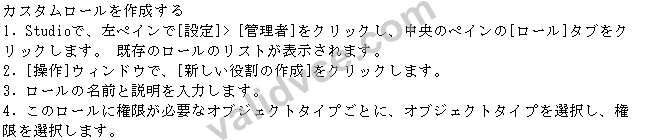

1. Click Save.
To create a scope
1. In Studio, click Configuration > Administrators in the left pane, then click the Scopes tab in the middle pane. A list of
existing scopes appears.
2. In the Actions pane, click Create new Scope.
3. Type a name (for example, 'Sales') and a description (for example, 'Delivery Groups used by Sales') for the scope.
4. Select object types or specific objects:
a. To select all objects of a particular type (for example, Delivery Groups), select the object type.
b. To select specific objects, expand the type, then select the individual objects (for example, individual Delivery
Groups used by the Sales team).
5. Click Save.
SIMULATION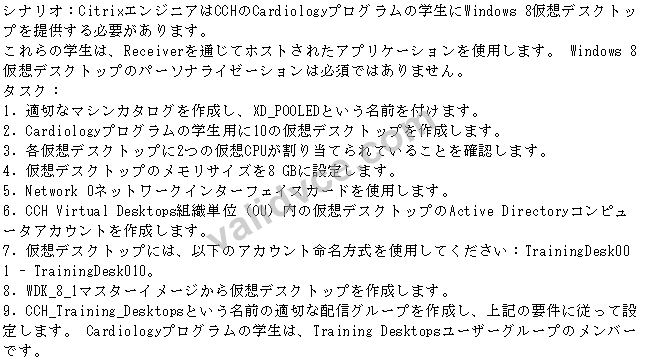

Correct Answer:
XenDesktop 7 Machine Catalog
1. In Desktop Studio we want to create a VM catalog,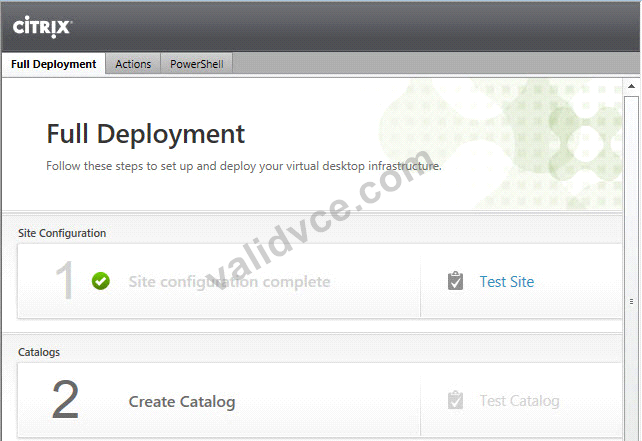
2. Choose the OS type
3. We will be using VMs and Citrix Machine Creation Services, so the defaults are fine.
4. Use the default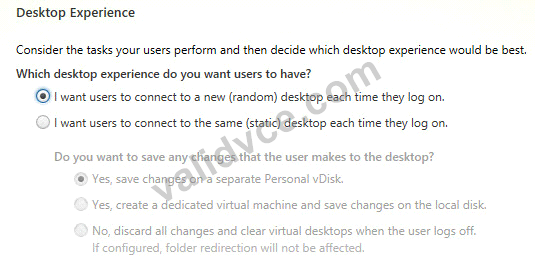
5. Choose the master image WDK_8_1 master image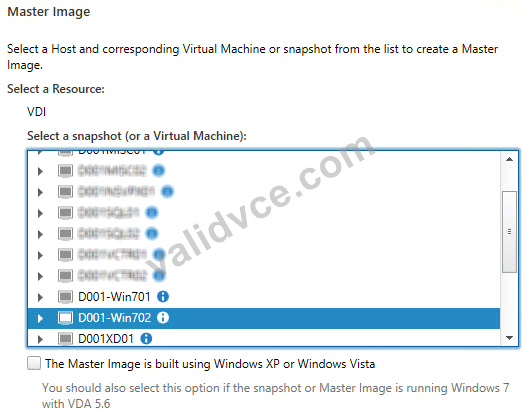
6. A great feature of XenDesktop is the ability to customize the catalog hardware at provisioning time, so you can offer
different tiers of VMs from the exact same master image. No need to build up templates with the same OS and
software stack, just to customize the vCPUs and memory specs.
7. OU -
8. On the summary screen you need to give the catalog a name and a description.
9. After you kick off the provisioning process you get a nice status. MCS first makes a copy of your master VM, then
does its magic to create copies
.
10. When the provisioning is completed you now have one machine catalog entry
11. If you double click on the machine catalog it will bring up a search window with the individual VMs listed. You can
now power them on and wait for them to show a "registered" status. If you click on an individual VM it will pull up
even more details. If a user had an active session to the VM then you get a plethora more data.
As you can see, creating a machine catalog from a master template is quick and easy. Within Desktop Studio you can
view a tremendous amount of detail about the catalog and individual VMs.

Viewing page 1 out of 23 pages.
Viewing questions 1-5 out of 112 questions.


 0 Customer Reviews


