

Good products, best service: free demo, three study formats, daily updates, instant delivery, loyalty discounts, and a written refund policy. ValidVCE covers the whole VMware Certified Advanced Professional 6 - Network Virtualization Deployment journey — open the 23 practice questions for the 3V0-643 exam and make success a matter of preparation, not luck.
VMware 3V0-643 Exam Overview:
| Certification Vendor: | VMware |
|---|---|
| Exam Name: | VMware Certified Advanced Professional 6 - Network Virtualization Deployment Exam |
| Exam Number: | 3V0-643 |
| Exam Format: | Hands-on configuration and troubleshooting tasks, Performance-based lab exam |
| Certificate Validity Period: | 2 years |
| Real Exam Qty: | Lab-based performance exam (no fixed number of questions) |
| Available Languages: | English |
| Exam Duration: | 135 minutes |
| Related Certifications: | VMware Certified Professional - Network Virtualization (VCP-NV) VMware Certified Advanced Professional 6 - Network Virtualization Design (VCAP6-NV Design) |
| Exam Price: | Approximately USD $400–$450 |
| Recommended Training: | VMware NSX Advanced Troubleshooting VMware NSX Install, Configure, Manage |
| Exam Registration: | VMware Certification Registration (Pearson VUE) |
| Sample Questions: |  |
| Exam Way: | Hands-on lab exam (delivered via VMware authorized testing centers or proctored environments) |
| Pre Condition: | Recommended: VMware Certified Professional - Network Virtualization (VCP-NV) or equivalent NSX experience |
| Official Syllabus URL: | https://www.vmware.com/education-services/certification.html |
VMware 3V0-643 Exam Syllabus Topics:
| Section | Objectives |
|---|---|
| Topic 1: Logical Routing and Edge Services | - Distributed Logical Router (DLR) and ESG configuration
|
| Topic 2: Logical Switching | - VXLAN and logical switch implementation
|
| Topic 3: NSX Installation and Configuration | - Deploy and configure NSX components
|
| Topic 4: Troubleshooting and Operations | - Identify and resolve NSX environment issues
|
| Topic 5: Network Security Services | - NSX firewall configuration
|
VMware 3V0-643: Before You Decide
The VMware Certified Advanced Professional 6 - Network Virtualization Deployment exam is split across 5 areas, with Troubleshooting and Operations, Logical Switching, Logical Routing and Edge Services carrying the most weight. Study in proportion to those shares — the full outline is in the section above this page.
The 3V0-643 exam is VMware's official certification test — passing it earns the VMware Certified Advanced Professional 6 - Network Virtualization Deployment (VCAP6-NV Deployment / VCIX6-NV Deployment) credential at the Expert level. Its influence comes from how practical it is: employers use the VMware Certified Advanced Professional 6 - Network Virtualization Deployment certificate as proof that you can do the work, not just talk about it. It also connects to VMware Certified Professional - Network Virtualization (VCP-NV), VMware Certified Advanced Professional 6 - Network Virtualization Design (VCAP6-NV Design), giving the credential a natural next step.
Yes — ValidVCE offers a free demo of the VMware Certified Advanced Professional 6 - Network Virtualization Deployment questions so you can see the quality before you pay. After purchase, 365 days of free updates are included; once the year expires, renew the update service at a 50% discount from your member zone.
Registration is handled through VMware's official channels:
Delivery of the exam itself is via Hands-on lab exam (delivered via VMware authorized testing centers or proctored environments).
Delivery is instant: your 3V0-643 product is emailed within one minute of payment — if nothing arrives within 2 hours, check spam and contact our 7x24 support; we reply within two hours and resend immediately. On failure, the guarantee has written terms: sit the corresponding 3V0-643 exam within 60 days of purchase, submit a scanned enrollment slip and the official Score Report PDF within 2 days after the exam, and the refund completes within 7 days. The policy covers the corresponding exam only; attempts within 3 days of purchase, exams never actually taken, free materials, and expired orders are excluded, and the candidate name must match the payer name. If you prefer, exchange your product for two free exam products of equal value and keep the update service on the original.
Yes, the vendor recommends these options:
Training covers the theory; the 23 practice questions for the 3V0-643 exam from ValidVCE test it under real exam conditions.
The VMware Certified Advanced Professional 6 - Network Virtualization Deployment exam contains Lab-based performance exam (no fixed number of questions) questions within 135 minutes. That is a tight ratio — the candidates who finish calmly are the ones who practiced under a clock. Run full timed sessions in the ValidVCE test engine until 3V0-643 exam pacing becomes habit, not hope.
Recommended: VMware Certified Professional - Network Virtualization (VCP-NV) or equivalent NSX experience These rules are set by VMware and may change, so confirm the current requirements on the official exam page: https://www.vmware.com/education-services/certification.html before registering for the VMware Certified Advanced Professional 6 - Network Virtualization Deployment exam.
VMware Certified Advanced Professional 6 - Network Virtualization Deployment Sample Questions:
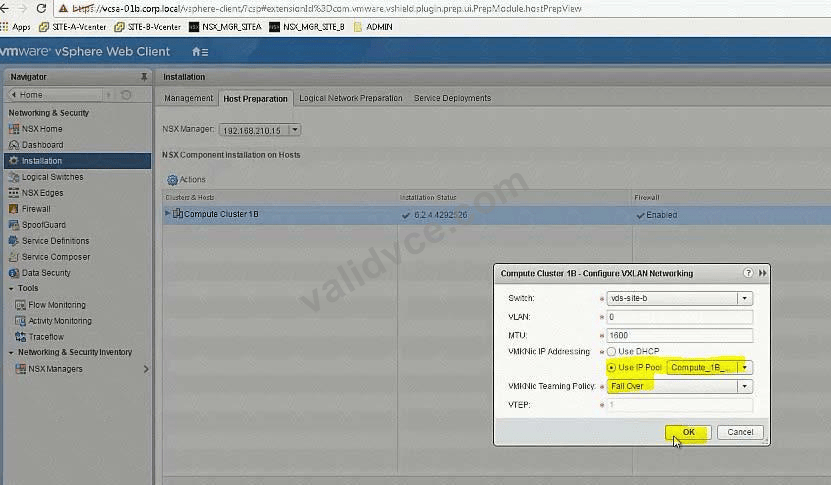
In the previous scenario, vCenter vcsa-b.corp.local was configured for NSX. Now the hosts must be prepared for NSX and the initial VXLAN configuration should be completed.
Requirements:
vCenter: vcsa-01b.corp.local
Credentials: [email protected] / VMware1!
Cluster: Compute Cluster 1B
ESXi Hosts: esx-01b.corp.local, esx-02b.corp.local
VTEP Information:
VMKNic Teaming Policy: Fail Over
VLAN: 0
MTU: 1600
IP Pools for VTEP:
* Name: Compute_1B_VTEP_Pool-New
* Gateway: 192.168.230.1
* Prefix Length: 24
* Static IP Pool: 192.168.230.51 - 192.168.230.60
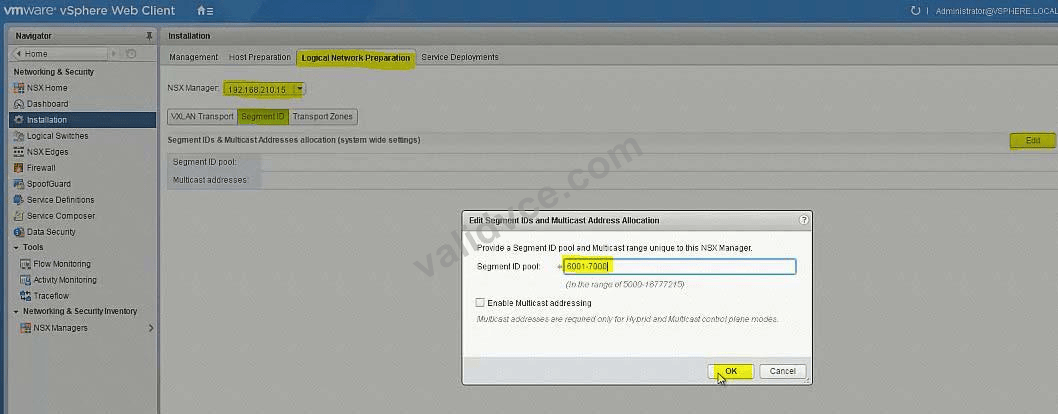
* Segment ID Pool: 6001-7000 - HOL 1903-01 Page 26-36
* VXLAN Span: Compute Cluster 1B - HOL 1903-01 Page 26-36
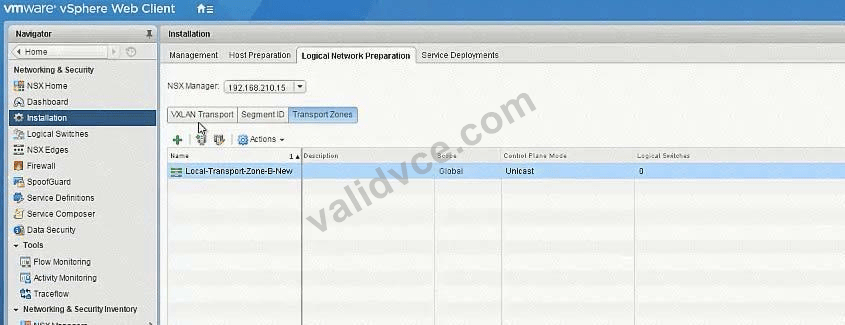
* Transport Zone: Local-Transport-Zone-B-New - HOL 1903-01 Page 26-36
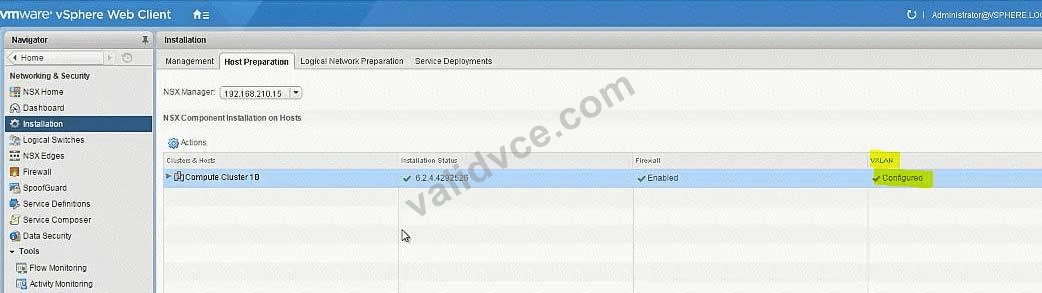
* Host must be prepared for NSX
* Use provided information to complete the initial VXLAN configuration.
* The underlying physical network does not support multicast.
* Ensure that requirements are met:
* Create the IP Pool as given:
* Do the Host preparation.
* Create a Local Transport Zone as given. - HOL 1903-01 Page 26-36
* Create the segment ID as given. - HOL 1903-01 Page 26-36
HOL LAB for Practice:
http://docs.hol.vmware.com/hol-isim/HOL-2019/hol-1903-01-nsxinstall-p2.htm and LAB - HOL 1903-01 Page 26-36 See the explanation part for complete solution.
Correct Answer:
SOLUTION:
HOL 1903-01 Page 26-36
Login to vCenter b Web Client and from Networking and Security -> Installation -> select to SiteB NSX Manager -> Host Preparation and prepare the hosts as below: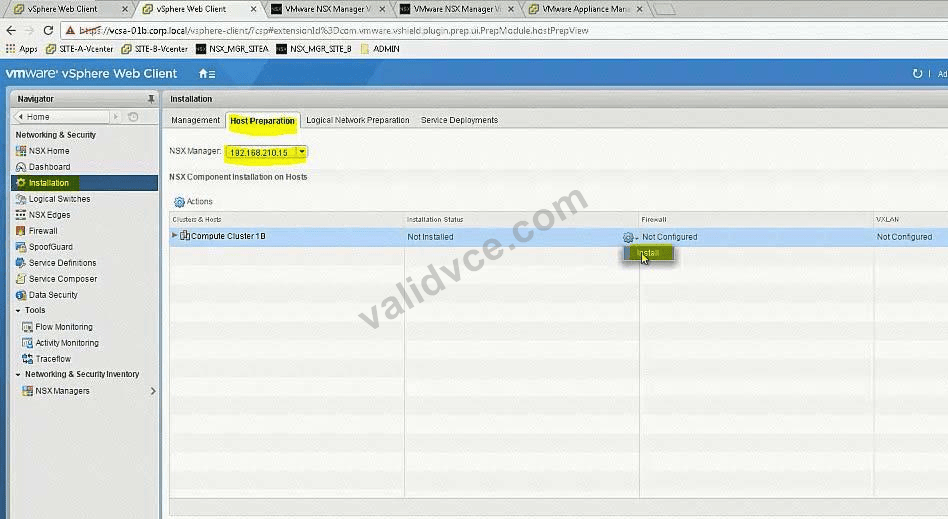
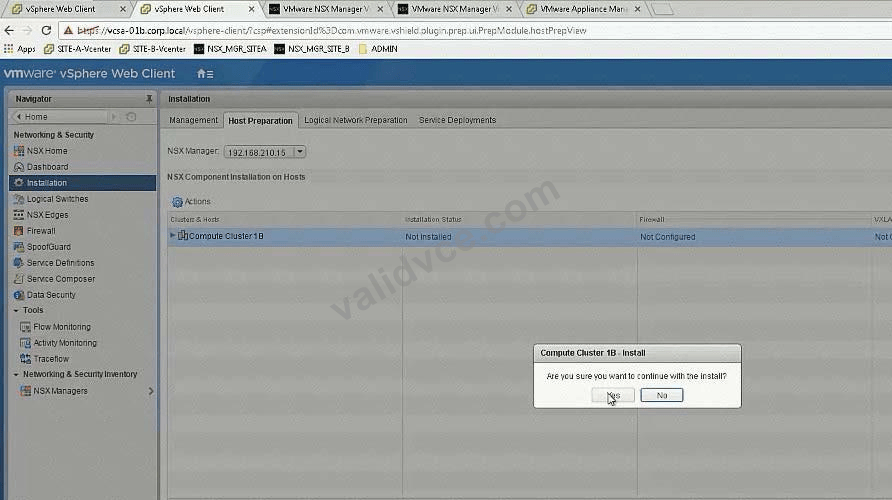
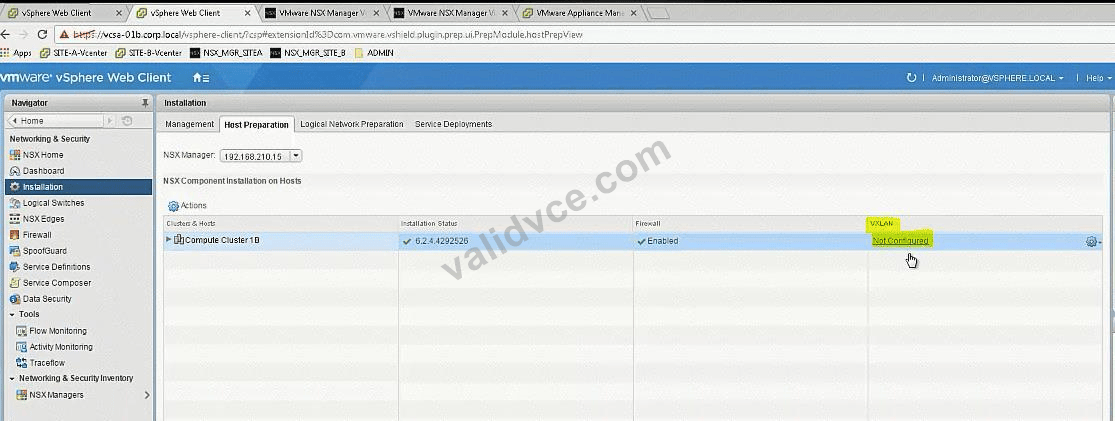
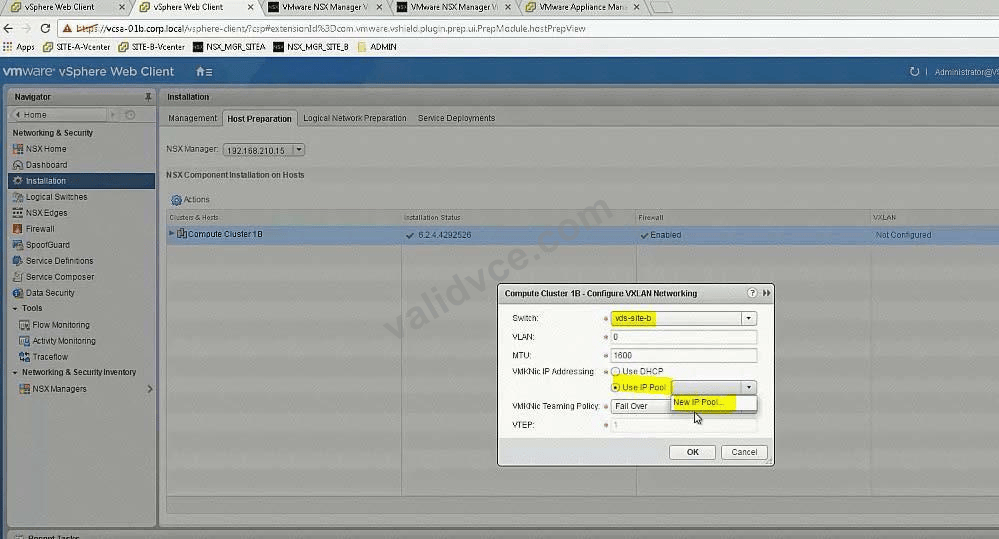
Add Static Pool as per give details in the QUESTION

In the Dev environment, you have the application and database servers on separate networks created previously. Configure inbound only network security to allow only Dev application servers access to Dev database servers using MYSQL service port.
Requirements:
vCenter: vcsa-01a.corp.local
Credentials: [email protected] / VMware1!
Service Port: MYSQL
Networks: Dev-App-Tier-01-NEW and Dev-DB-Tier-01-NEW
Credentials for Dev VMs: root / VMware1!
This rule should be in its own "DB security-NEW" section.
Ensure inbound only network security allows Dev application servers access to Dev database servers.
This rule should not be prpogated to all NSX prepared clusters.
This rule should be created in a way that any new virtual machines on App and DB segments will be secured.
This rule should be created with the fewest rule(s) possible.
All other servers should be denied.
Ensure inbound security requirements are met.
HOL LAB for Practice:
See the explanation part for complete solution.
Correct Answer:
SOLUTION:
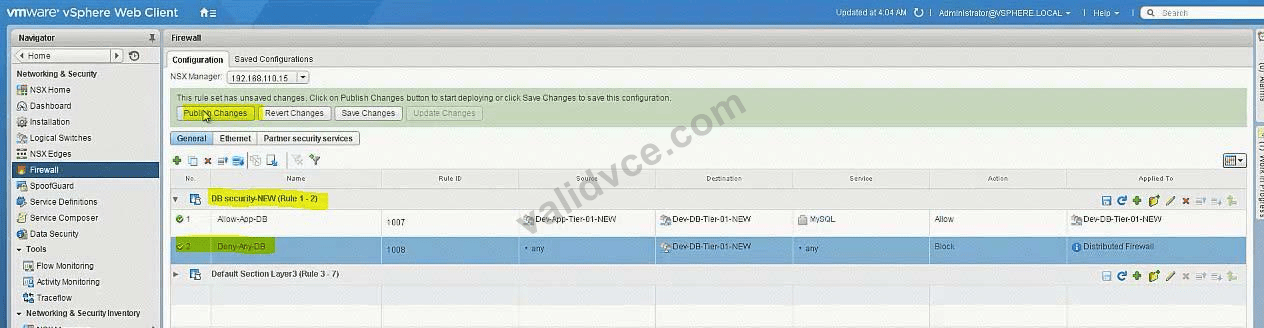
Firewall -> add new Section:

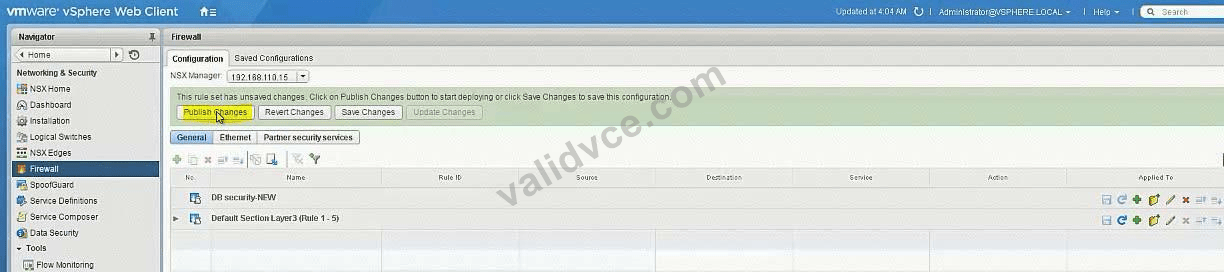
Add new Rule under newly created Section: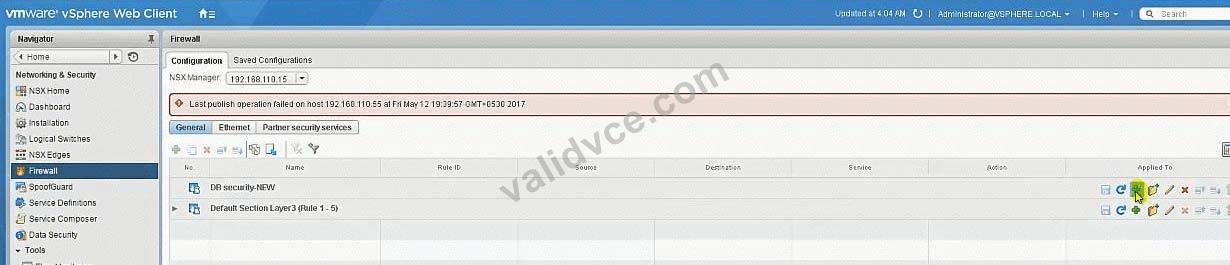
Edit Rule Name: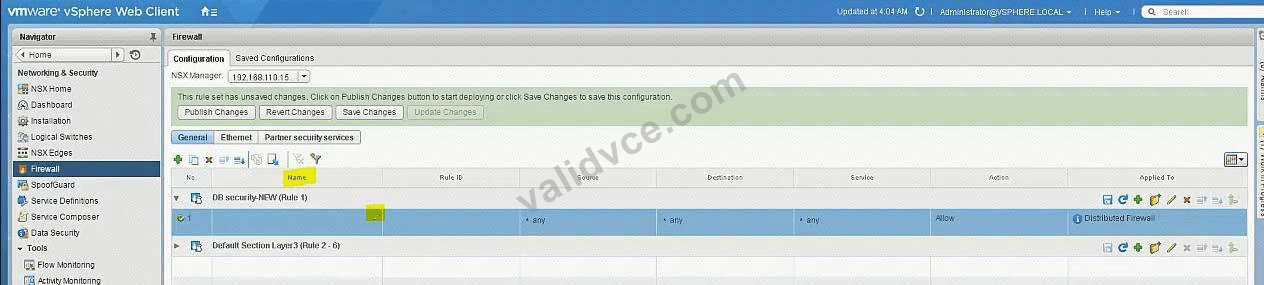
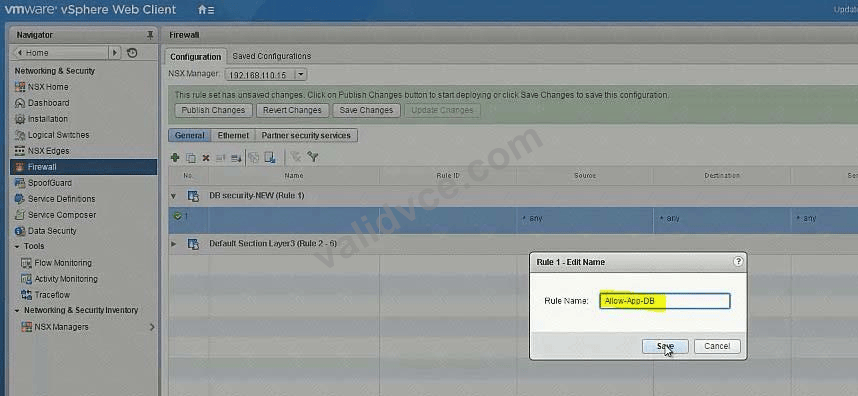
Source = Dev-App-Tier-01-NEW (LS)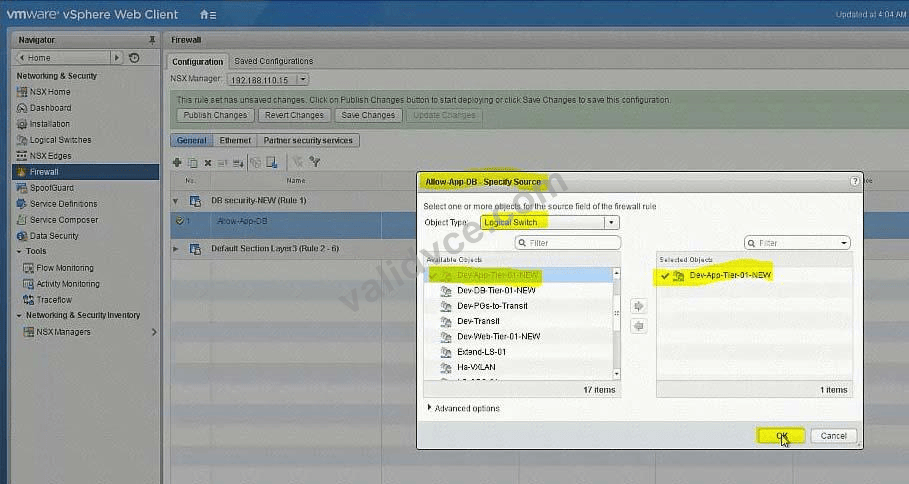
Destination = Dev-DB-Tier-01-NEW (LS)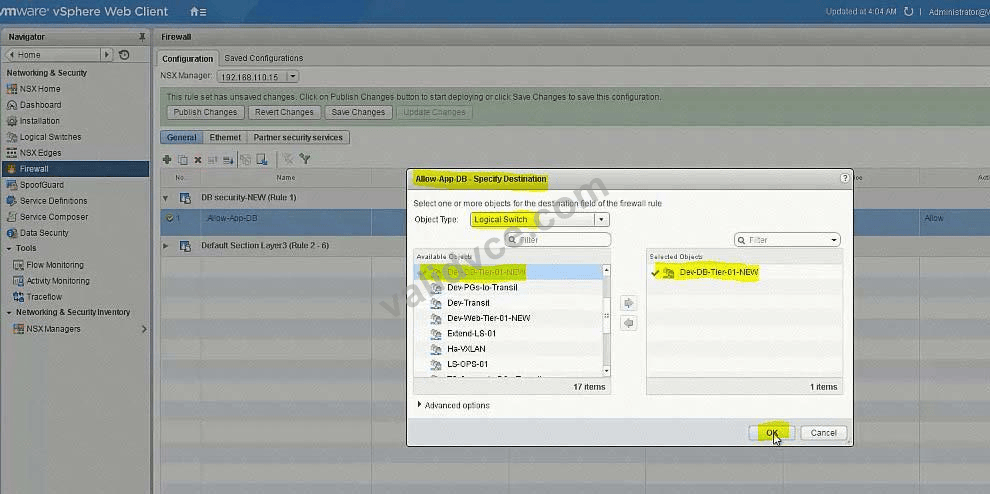
Service = MySQL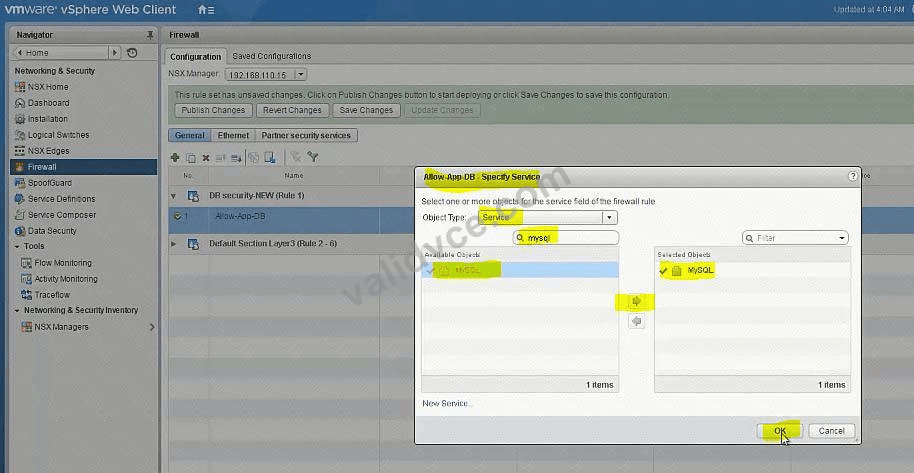
Allow - In
Applied To: Logical Switch = Dev-DB-Tier-01-NEW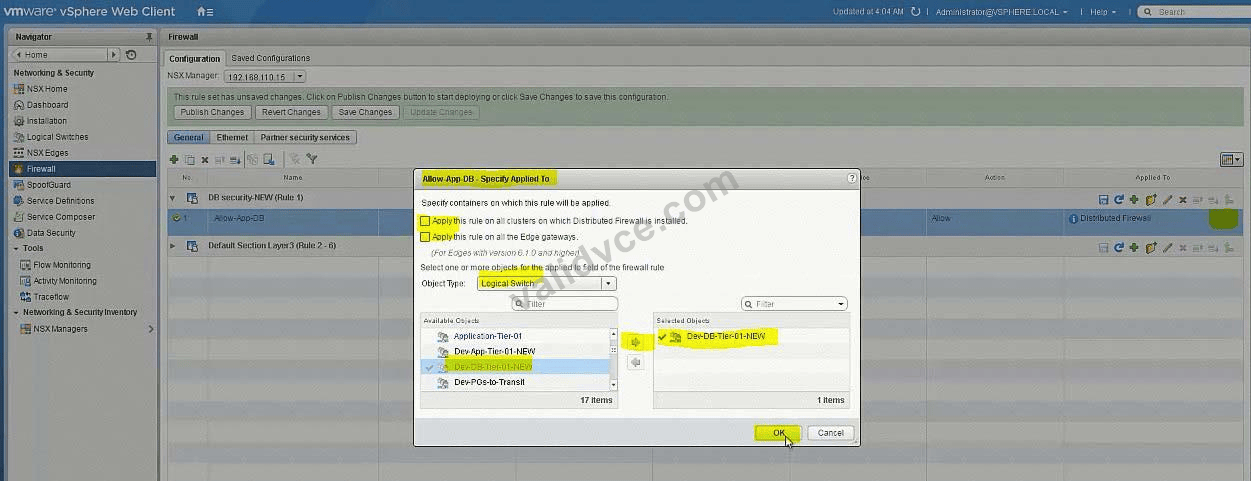
Add another rule = To Deny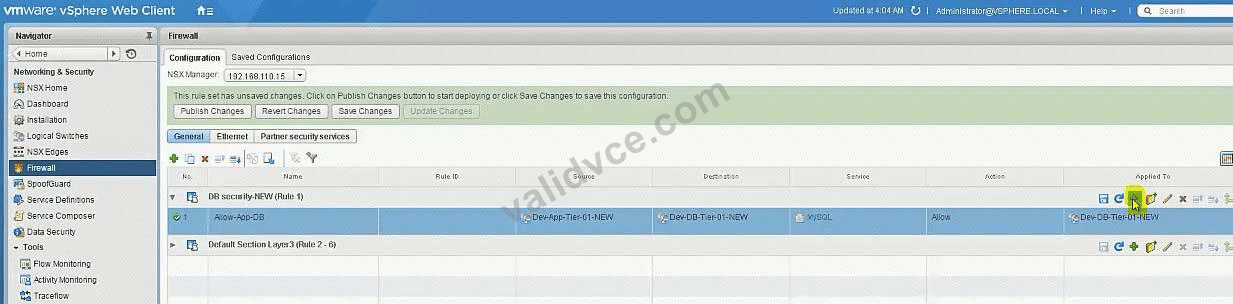

Set destination: Logical Switch = Dev-DB-Tier-01-NEW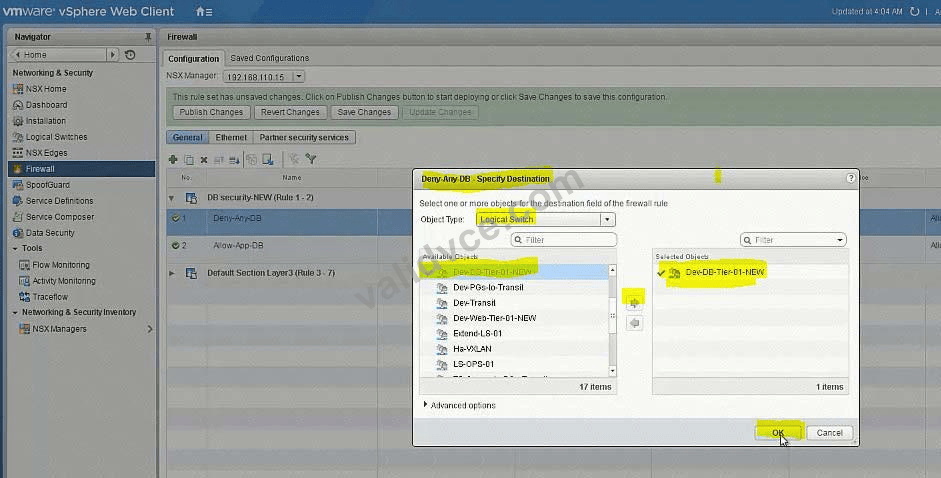
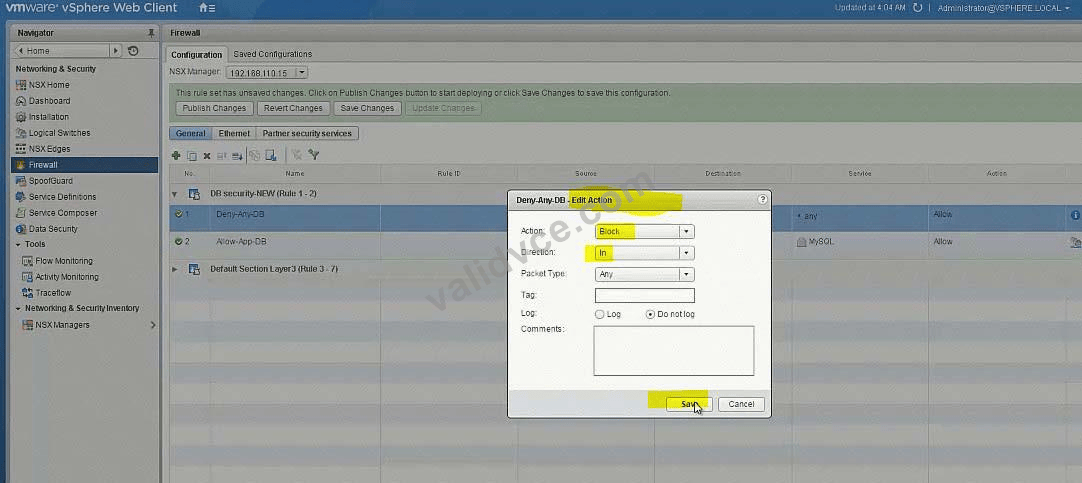
Bring to last the Deny rule: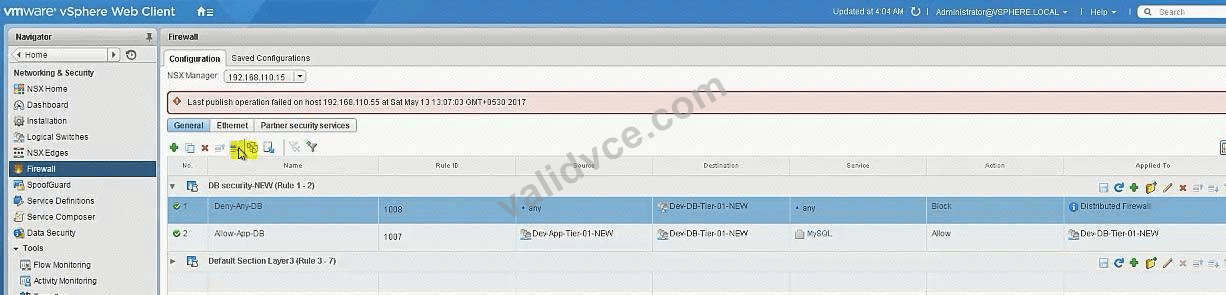
Enable load balancing for the development environment allowing HTTPS access to the Dev-Web-01a and Dev-Web-02a servers.
Requirements:
vCenter: vcsa-01a.corp.local
Credentials: [email protected]
Self-signed certificate parameters:
Common Name: 192.168.5.100
Organization Name: ABC Medical
Organization Unit: IT
Locality: Palo Alto
State: CA
Country: United States
Message Algorithm: RSA
Key Size: 2048
Number of Days: 365
Web Servers: Dev-Web-01a, Dev-Web-02a
Use the secondary IP address of 192.168.5.100
New connections should consider current connections among all available members of the pool.
The web servers will not have SSL certificates installed. The web team has indicated that analytics based on source IP should be available.
Ensure all requirements have been met.
HOL LAB for Practice:
Load Balancer and other questions 7, 8, 9
See the explanation part for complete solution.
Correct Answer:
SOLUTION:
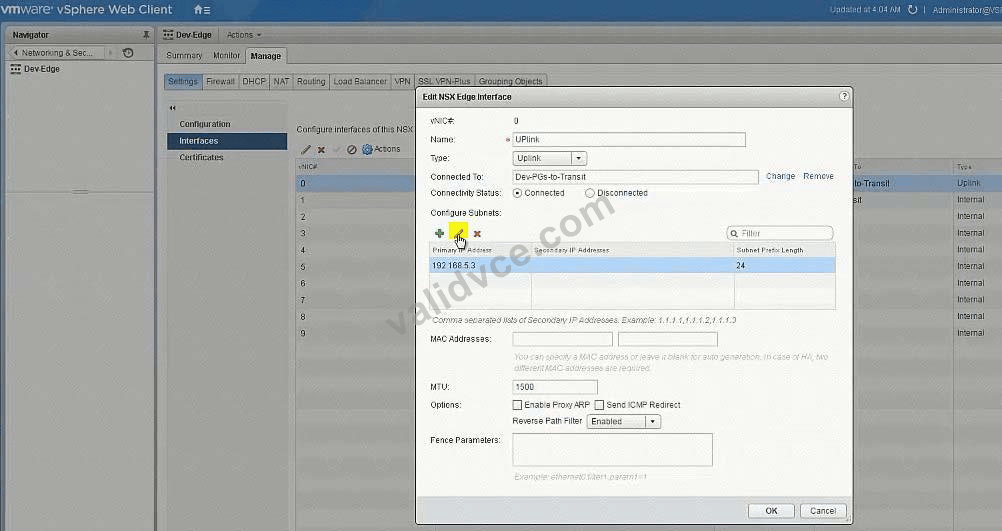
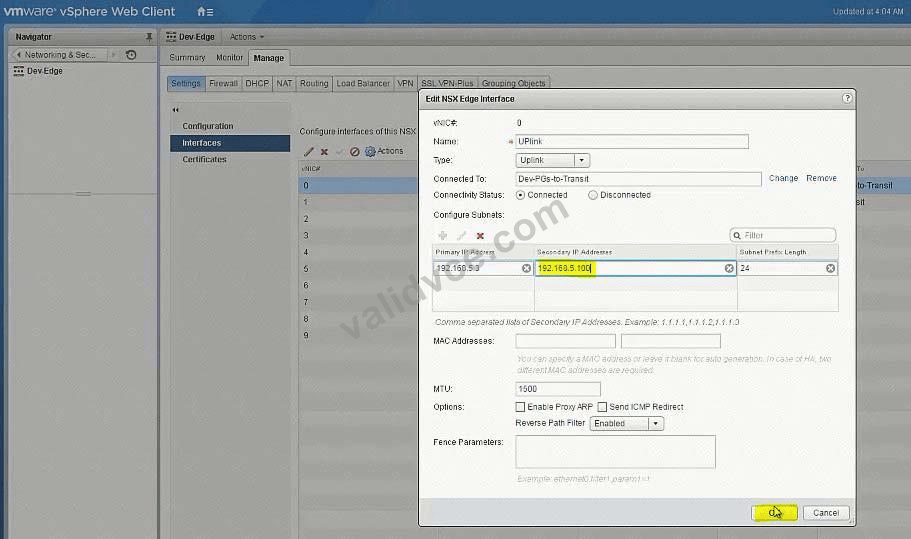
Create Secondary address on Uplink Interface.
Generate CSR using the give details.
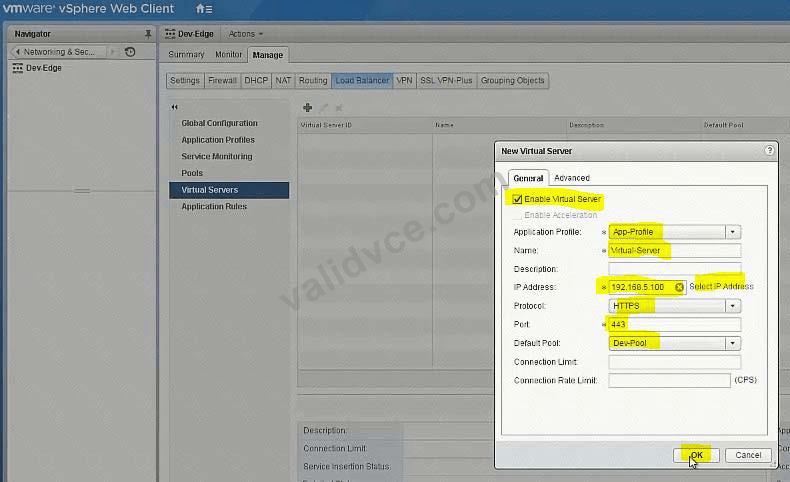
Enable Load-Balancer, create Profile, create Virtual Server.
Dev-Edge -> Manage -> Settings -> Interfaces -> Edit and add secondary IP address: 192.168.5.100

Create CSR as per given details from the question:
Dev-Edge -> Manage -> Settings -> Certificate -> Actions -> Generate CSR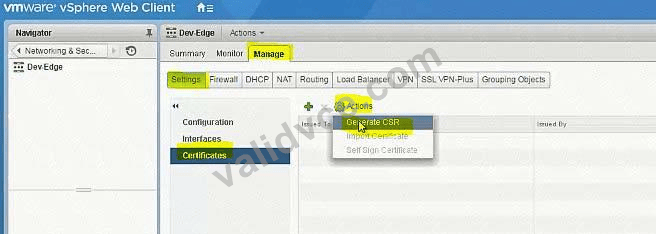

Dev-Edge -> Manage -> Settings -> Certificate -> Actions -> Self Sign Certificate: Days = 365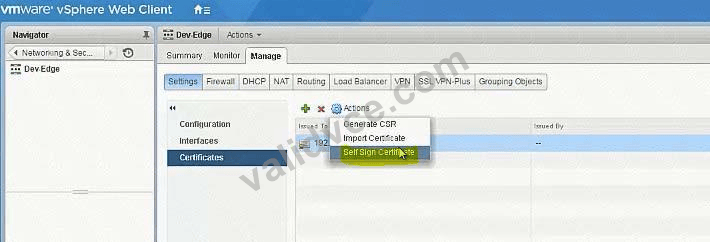

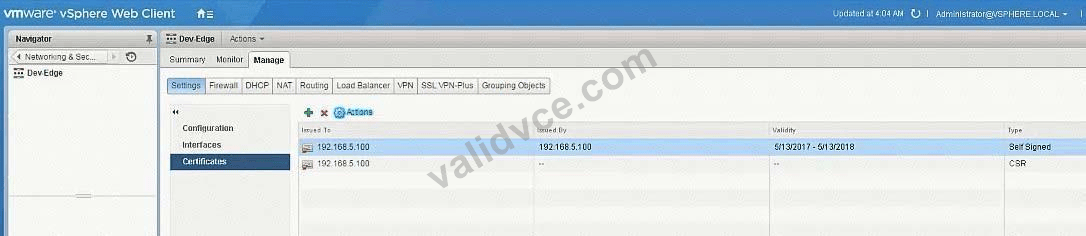
Dev-Edge -> Manage -> Load Balancer -> Global Configuration -> Edit
Enable Load Balancer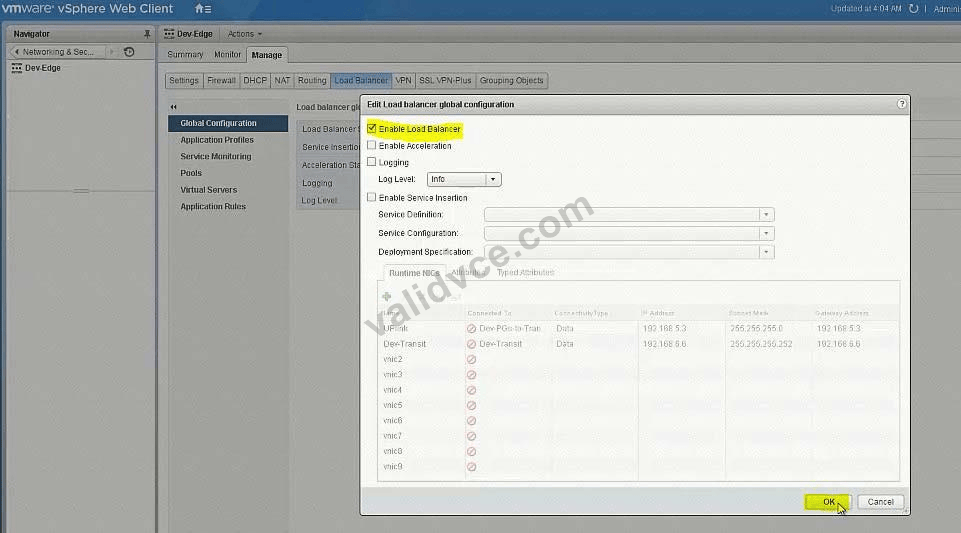
Create Application Profile: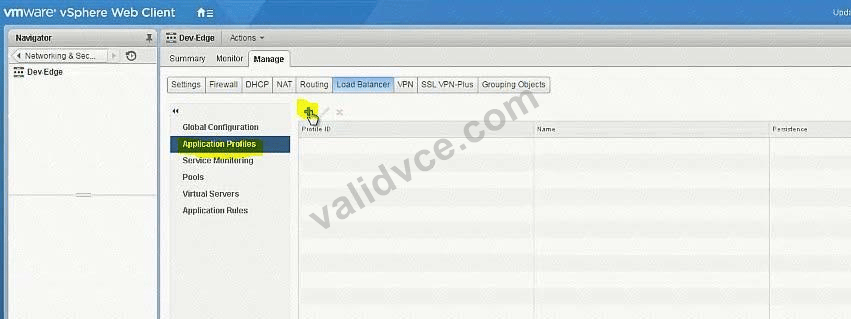
Check box for inser-forward-for-httpheader also below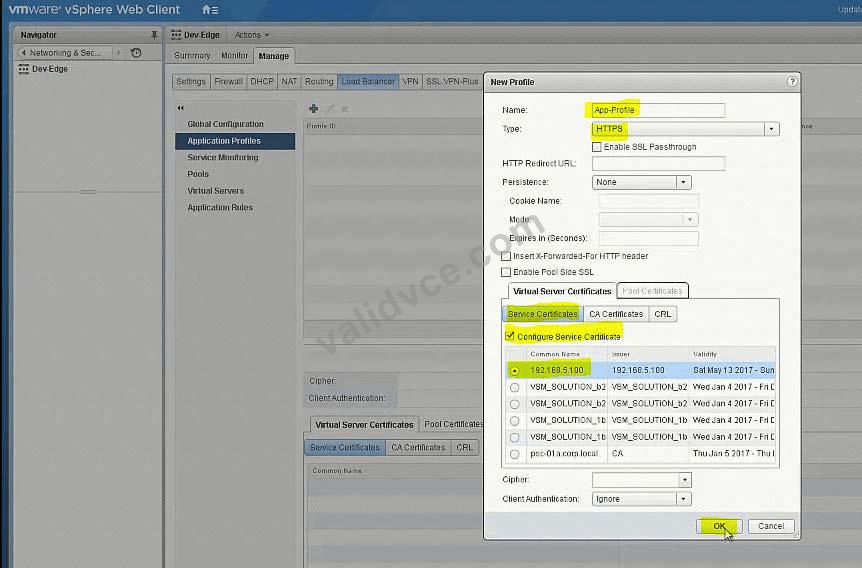
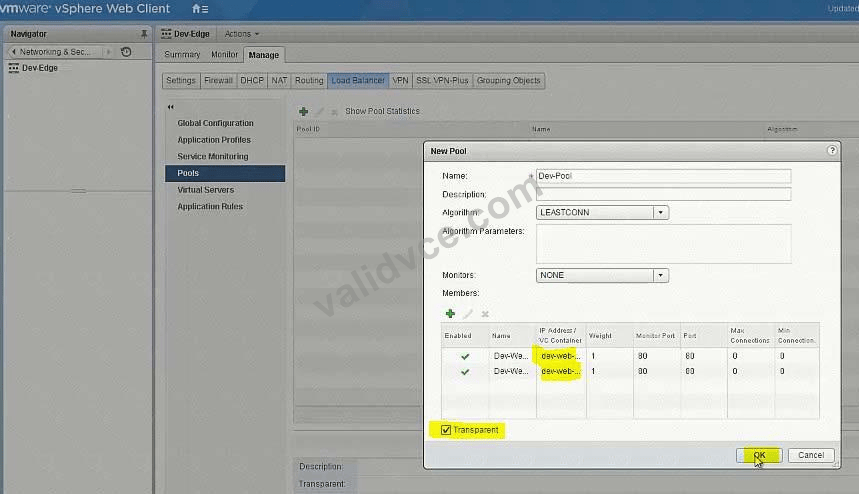
Create new Pool: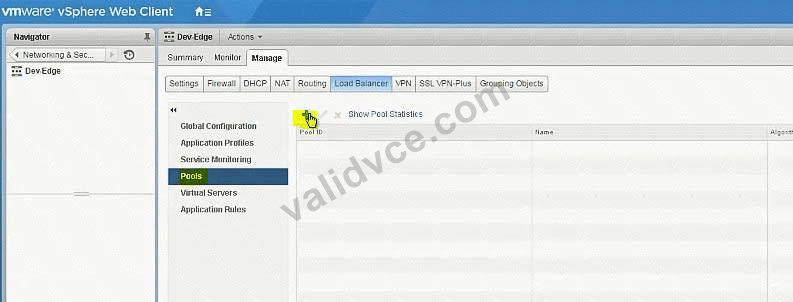

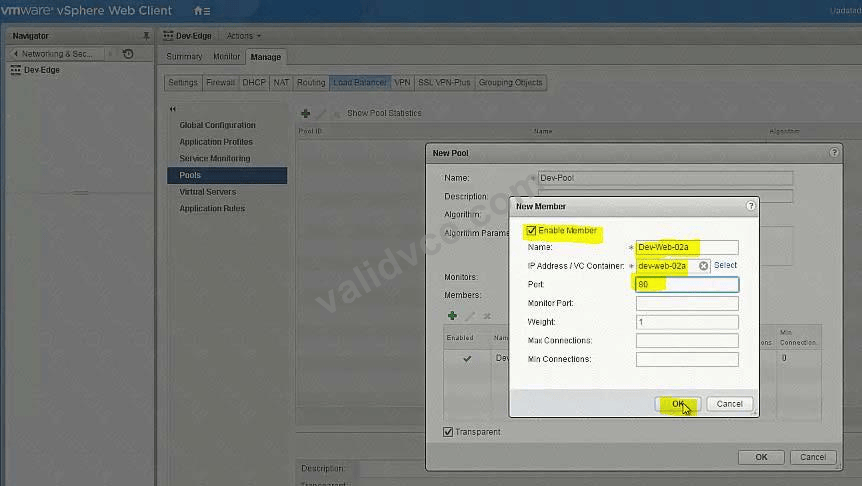
Add both Web member servers: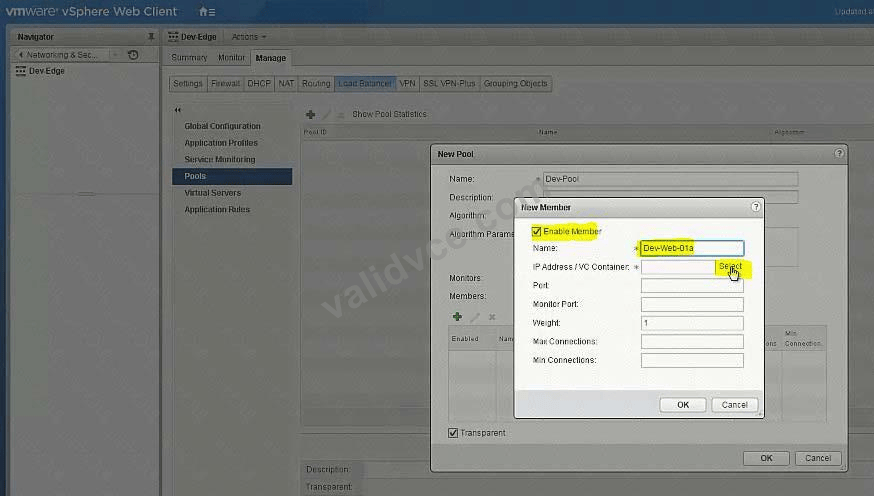
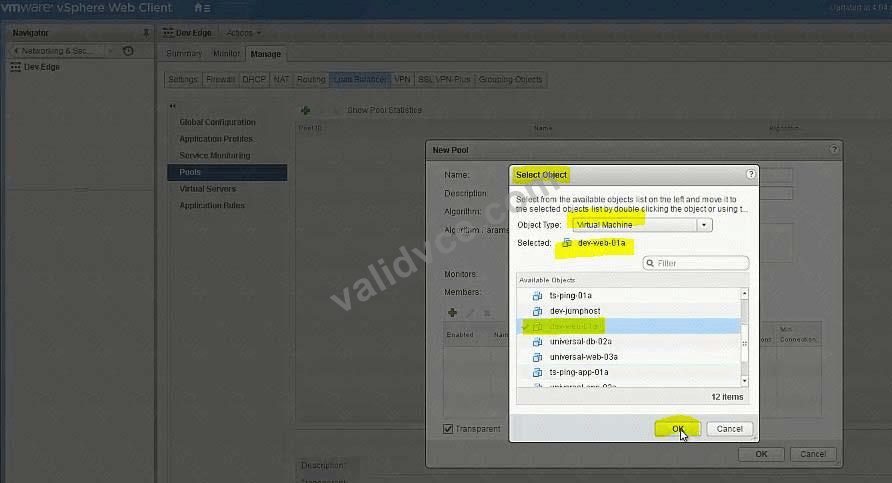
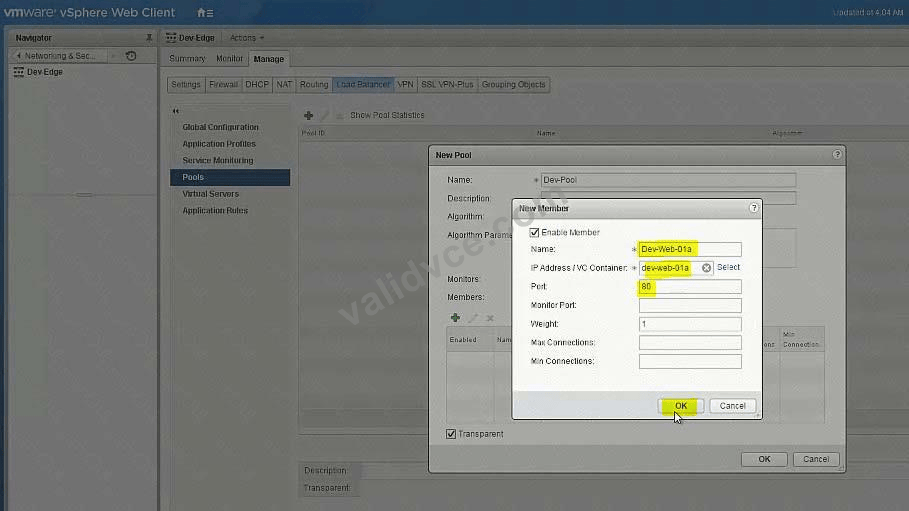
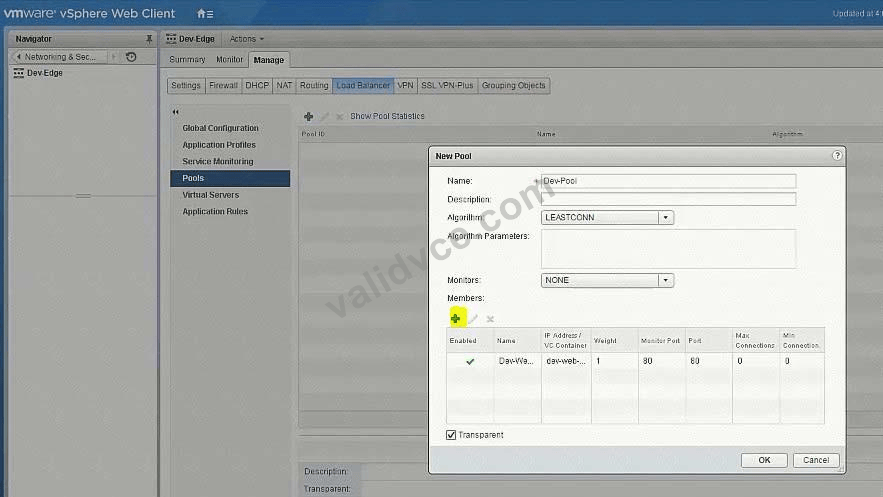
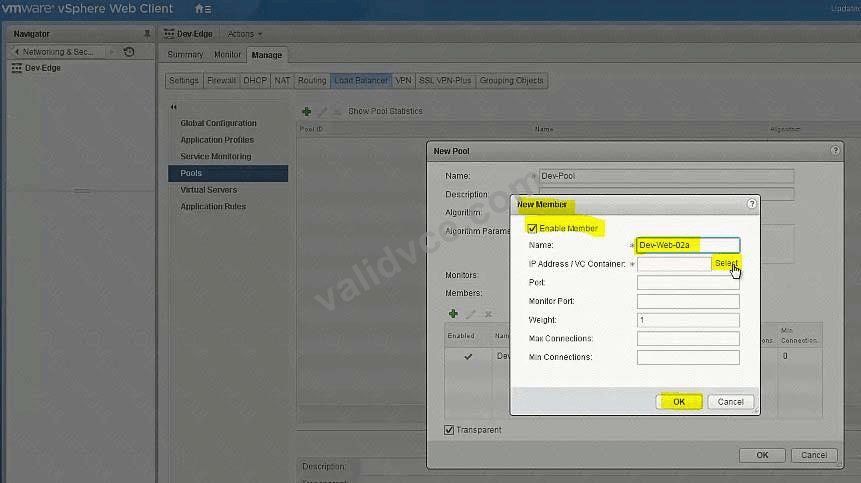
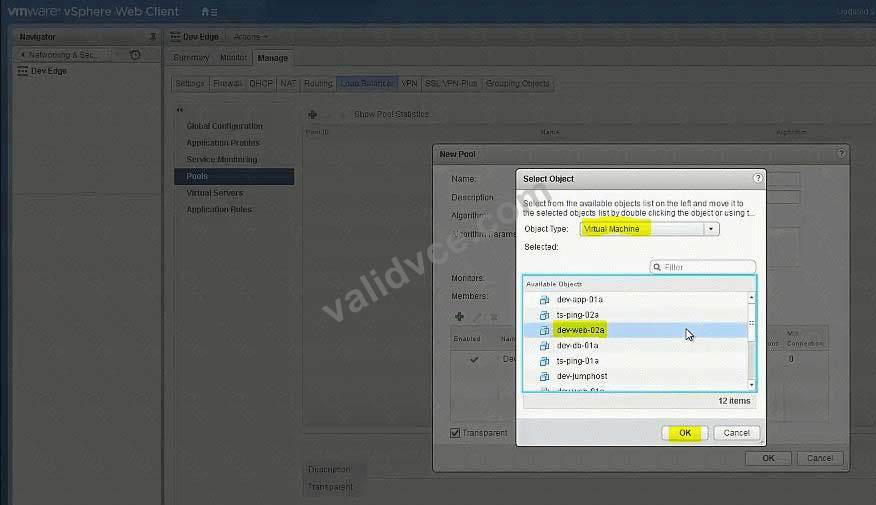
Add Virtual Servers:
Viewing page 1 out of 8 pages.
Viewing questions 1-3 out of 23 questions.


 1060 Customer Reviews


