

Certification objectives can change, so current preparation matters in 2026. ValidVCE reviews and updates its C_ADBTP practice questions for SAP Administrating SAP Business Technology Platform(C_ADBTP_2601), and every purchase includes 365 days of free updates.
Choose Your C_ADBTP Study Format
- Printable PDF: prepared by experts, available for instant download, suitable for study anywhere, and supported by 365 days of free updates.
- Desktop Test Engine: installable Windows software with two practice modes, offline access, and an environment that simulates the exam experience.
- Online Test Engine: instant access through major web browsers on Windows, Mac, Android, and iOS, with test history and performance review.
Order Support from ValidVCE
- Security and privacy protection backed by McAfee.
- A free PDF demo is available so you can review the format and quality before purchasing.
- Every purchase includes 365 days of free updates, with renewal available at a 50% discount after expiration.
- Products are delivered by instant download and by email within one minute after payment. Contact customer support if the message does not arrive within two hours.
- There is no restriction on the number of computers where the product can be installed.
SAP C_ADBTP Exam Overview:
| Certification Vendor: | SAP |
|---|---|
| Exam Name: | SAP Certified Associate - Administrating SAP Business Technology Platform |
| Exam Number: | C_ADBTP |
| Exam Duration: | 180 minutes |
| Available Languages: | English |
| Exam Format: | Scenario-based Questions, Multiple Choice, Multiple Response |
| Recommended Training: | SAP BTP Official Documentation SAP Learning Journey - SAP BTP Administration |
| Exam Registration: | SAP Training and Certification Shop |
| Sample Questions: |  |
| Exam Way: | Online proctored exam via SAP Certification platform |
| Pre Condition: | No mandatory prerequisites; recommended practical experience with SAP BTP administration and cloud concepts. |
| Official Syllabus URL: | https://training.sap.com/certification/ |
SAP C_ADBTP Exam Syllabus Topics:
| Section | Objectives |
|---|---|
| Topic 1: Connectivity and Integration | - Cloud Connector configuration - On-premise connectivity - API and service connectivity |
| Topic 2: Administration and Operations | - Monitoring and logging - User and role management - Subaccount administration |
| Topic 3: Runtime and Environment Management | - Cloud Foundry environment administration - Kyma runtime basics - Service instance lifecycle management |
| Topic 4: SAP Business Technology Platform (BTP) Fundamentals | - Core concepts of SAP BTP - Entitlements and quotas - Global account, subaccount, and directory structure |
| Topic 5: Security and Identity Management | - Trust configuration (IAS / Identity Providers) - Authentication and authorization concepts - Role collections and role management |
SAP C_ADBTP Exam Questions Answered
The C_ADBTP exam leads to the SAP Certified Associate certification from SAP. It is positioned at the Associate level. The exam validates the knowledge and skills expected of candidates preparing for SAP Administrating SAP Business Technology Platform(C_ADBTP_2601).
No mandatory prerequisites; recommended practical experience with SAP BTP administration and cloud concepts.
Eligibility rules can change, so confirm the current requirements on the official exam page before registering.
You can register through the official channels listed below:
The available exam delivery method is Online proctored exam via SAP Certification platform.
The official training options include:
After reviewing the recommended training, reinforce what you learned with ValidVCE's 10 practice questions for C_ADBTP.
Yes. ValidVCE provides a free PDF demo so you can review the format, question style, and answer quality before placing an order. Your purchase includes 365 days of free updates, and expired products can receive continued update service at a 50% discount.
If you purchase the corresponding C_ADBTP preparation material and do not pass that exam within 60 days of purchase, you may apply for a full refund under the 100% Money Back Guarantee. The request requires a scanned exam enrollment slip and the official Score Report PDF, submitted within two days after the exam. Eligible requests are processed within seven days.
Claims are not eligible if the exam was taken within three days of purchase, the product was downloaded without an exam attempt, the order was free or expired, or the candidate name does not match the payer name. If you prefer an exchange instead of a refund, you can receive two free products of equal value while keeping the update service for your original purchase.
Delivery is immediate after checkout. The download is available right away, and the product is also sent to your email within one minute. Contact customer support if it has not arrived within two hours. You may install the product on an unlimited number of computers.
The current C_ADBTP outline is organized into 5 top-level domains. The first listed areas include:
- SAP Business Technology Platform (BTP) Fundamentals
- Administration and Operations
- Runtime and Environment Management
Review the Exam Topics section above for the complete outline and any nested subtopics.
SAP Administrating SAP Business Technology Platform(C_ADBTP_2601) Sample Questions:
SIMULATION
Task 3: Create Subaccounts with Default Provider and Region
In the Human Resources directory, create the subaccount EU HCM Dev (Description: Human Resources Development) with subdomain btpops####-eu-hcm-dev in the region Amazon Web Services (AWS) → Europe (Frankfurt) cf-eu10.2.
In the Human Resources directory, create the subaccount EU HCM Test (Description: Human Resources Testing) with subdomain btpops####-eu-hcm-test using EU HCM Dev as source subaccount.3.
In the Human Resources directory, create the subaccount EU HCM Prod (Description: Human Resources Production) with subdomain btpops####-eu-hcm-prod using EU HCM Dev as source subaccount. Set the subaccount as used in production.
Correct Answer:
See the Explanation below for complete solution.
Explanation:
You must create these 3 subaccounts inside the Human Resources directory:
EU HCM Dev
EU HCM Test
EU HCM Prod
Important:
Replace #### with your global account number
Enter names, descriptions, and subdomains exactly
EU HCM Prod must be marked as used in production
Task 3 - Create Subaccounts with Default Provider and Region
Before You Start
Log in to the SAP BTP Cockpit.
Open the correct Global Account.
Go to Directories.
Open the Human Resources directory.
Why this matters:
All 3 subaccounts in this task must be created inside Human Resources. If you create them anywhere else, the result will be incorrect.
Step 1 - Open the Human Resources Directory
What to do
In the left menu, choose Directories.
In the list, select Human Resources.
Explanation:
This is the parent directory where the required HR subaccounts must be created.
What to verify
You should now be inside the Human Resources directory.
Step 2 - Start Creating EU HCM Dev
What to do
Inside Human Resources, open Subaccounts.
Click Create → Subaccount.
Explanation:
This opens the form to create the first HR subaccount.
Step 3 - Enter Values for EU HCM Dev
What to do
Enter the following:
Display Name / Name: EU HCM Dev
Description: Human Resources Development
Subdomain: btpops####-eu-hcm-dev
Set the region as:
Cloud Provider: Amazon Web Services (AWS)
Region: Europe (Frankfurt)
Technical Region / Environment: cf-eu10
Then click Create.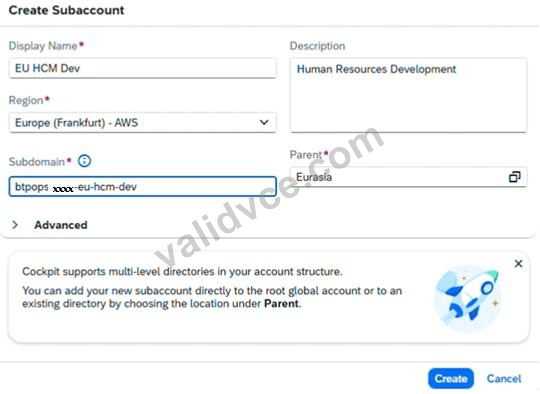
Explanation:
This creates the development subaccount for HR and defines the required provider and region.
This first subaccount is important because it will be used as the source subaccount for the next two subaccounts.
What to verify
After creation, you should see:
EU HCM Dev
under the Human Resources directory.
Step 4 - Confirm EU HCM Dev Exists
What to do
Check the subaccounts list in Human Resources.
Explanation:
You must make sure EU HCM Dev is available before you create the next subaccounts, because both EU HCM Test and EU HCM Prod must use it as the source subaccount.
What to verify
You should see:
EU HCM Dev
If it is missing, create it correctly before moving on.
Step 5 - Start Creating EU HCM Test
What to do
Still in the Human Resources directory, click Create → Subaccount again.
Explanation:
This opens the form for the test subaccount.
Step 6 - Enter Values for EU HCM Test
What to do
Enter:
Display Name / Name: EU HCM Test
Description: Human Resources Testing
Subdomain: btpops####-eu-hcm-test
Then select:
Source Subaccount: EU HCM Dev
Then click Create.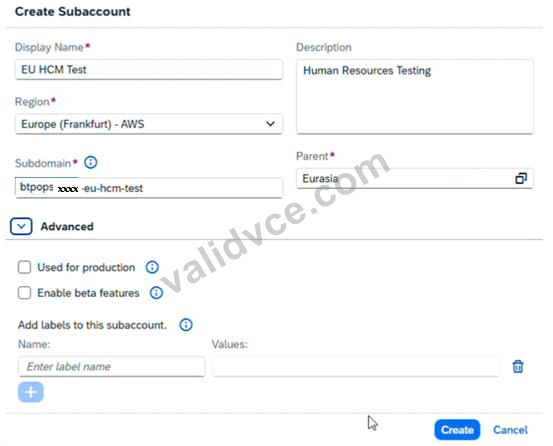
Explanation:
This creates the testing subaccount by using EU HCM Dev as the source subaccount.
This helps keep the configuration aligned with the development subaccount.
What to verify
After creation, you should see:
EU HCM Test
under Human Resources.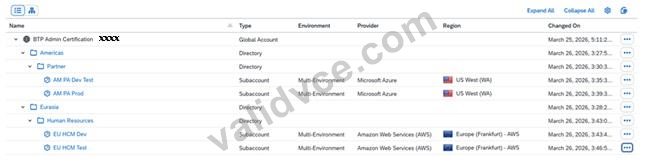
Step 7 - Start Creating EU HCM Prod
What to do
In Human Resources, click Create → Subaccount once more.
Explanation:
This opens the form for the production subaccount.
Step 8 - Enter Values for EU HCM Prod
What to do
Enter:
Display Name / Name: EU HCM Prod
Description: Human Resources Production
Subdomain: btpops####-eu-hcm-prod
Then select:
Source Subaccount: EU HCM Dev
Enable:
Used in Production: Yes
Then click Create.
Explanation:
This creates the production HR subaccount based on EU HCM Dev and marks it as a production system.
The production setting is mandatory here.
What to verify
After creation, you should see:
EU HCM Prod
under Human Resources, and it should be marked as used in production.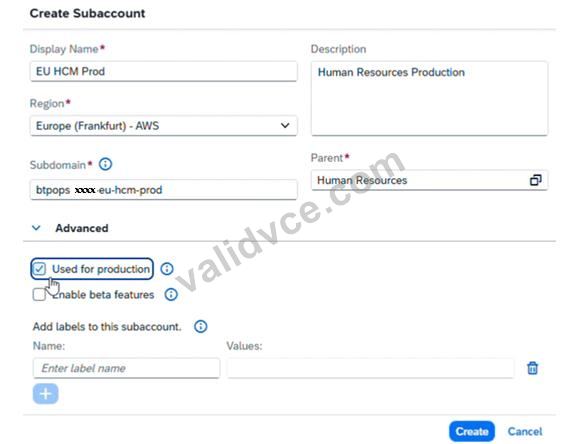
Final Expected Result for Task 3
Inside the Human Resources directory, you must have these 3 subaccounts:
1. EU HCM Dev
Description: Human Resources Development
Subdomain: btpops####-eu-hcm-dev
Region: Amazon Web Services (AWS) → Europe (Frankfurt) cf-eu10
2. EU HCM Test
Description: Human Resources Testing
Subdomain: btpops####-eu-hcm-test
Source Subaccount: EU HCM Dev
3. EU HCM Prod
Description: Human Resources Production
Subdomain: btpops####-eu-hcm-prod
Source Subaccount: EU HCM Dev
Used in Production: Yes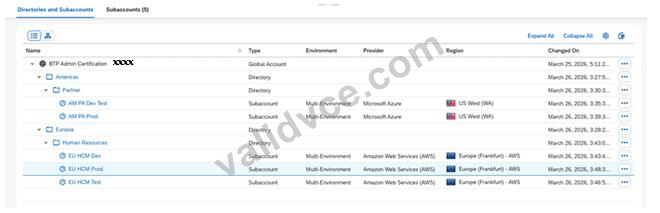
Common Mistakes to Avoid
1. Creating the subaccounts in the wrong directory
All 3 must be created inside:
Human Resources
Not under:
Global Account
Americas
Eurasia
Partner
2. Wrong subdomain values
Use exactly:
btpops####-eu-hcm-dev
btpops####-eu-hcm-test
btpops####-eu-hcm-prod
Only replace #### with your global account number.
3. Wrong region for EU HCM Dev
It must be:
Amazon Web Services (AWS)
Europe (Frankfurt)
cf-eu10
4. Wrong source subaccount
For both:
EU HCM Test
EU HCM Prod
you must select:
EU HCM Dev
5. Forgetting the production flag
For EU HCM Prod, make sure:
Used in Production is enabled
Viewing page 1 out of 10 pages.
Viewing questions 1-1 out of 10 questions.


 1128 Customer Reviews


