

HP HPE7-A02 Exam Info and Free Practice Test | ValidVCE
Pass HP HPE7-A02 Premium Files Test Engine pdf - Free Dumps Collection
HP HPE7-A02 exam is designed for IT professionals who want to be certified in network security. Aruba Certified Network Security Professional Exam certification will help individuals to validate their skills and knowledge in the field of network security, and to demonstrate their ability to protect their organization's network from potential threats.
HP HPE7-A02 exam covers a range of topics related to network security, including firewall technologies, intrusion detection and prevention, secure access technologies, and advanced authentication and authorization. HPE7-A02 exam is designed to test the candidate's ability to design, implement, and manage secure networks using Aruba products and technologies.
NEW QUESTION # 70
You are deploying a virtual Data Collector for use with HPE Aruba Networking ClearPass Device Insight (CPDI). You have identified VLAN 101 in the data center as the VLAN to which the Data Collector should connect to receive its IP address and connect to HPE Aruba Networking Central.
Which Data Collector virtual ports should you tell the virtual admins to connect to VLAN 101?
- A. The one with the highest MAC address
- B. The one with the lowest port ID
- C. The one with the lowest MAC address
- D. The one with the highest port ID
Answer: B
Explanation:
When deploying a virtual Data Collector for HPE Aruba Networking ClearPass Device Insight (CPDI), it is essential to ensure that the correct virtual port is connected to the designated VLAN. In this case, VLAN 101 is used to receive the IP address and connect to Aruba Central. The best practice is to use the virtual port with the lowest port ID. This is typically the primary port used for management and network connectivity in virtual environments, ensuring proper network integration and communication.
Reference: Aruba's ClearPass Device Insight deployment guides and virtual appliance setup documentation provide detailed instructions on configuring network interfaces and VLAN assignments.
NEW QUESTION # 71
A security team needs to track a device's communication patterns and identify patterns such as how many destinations the device is accessing.
Which Aruba solution can show this information at a glance?
- A. HPE Aruba Networking ClearPass Insight Endpoints and Network Dashboards
- B. AOS-CX Analytics Dashboard using the system-installed NAE agent
- C. HPE Aruba Networking ClearPass Policy Manager (CPPM) live monitoring Access Tracker
- D. HPE Aruba Networking ClearPass Device Insight (CPDI) under a device's network activity
Answer: D
Explanation:
HPE Aruba Networking ClearPass Device Insight (CPDI) can show detailed information about a device's communication patterns, including how many destinations the device is accessing. CPDI provides comprehensive visibility into the behavior and activity of devices on the network, allowing the security team to track and analyze communication patterns at a glance. This information is critical for identifying anomalies and potential security threats.
Reference: ClearPass Device Insight documentation and network activity monitoring guides offer insights into tracking and analyzing device communication patterns using CPDI's capabilities.
NEW QUESTION # 72
A company is using HPE Aruba Networking ClearPass Device Insight (CPDI) (the standalone application).
You have identified a device, which is currently
classified as one type, but you want to classify it as a custom type. You also want to classify all devices with similar attributes as this type, both already-discovered devices and new devices discovered later.
What should you do?
- A. In the device details, select filter, create a user tag based on the device attributes, and save the tag.
- B. In the device details, select reclassify, create a user rule based on its attributes, and choose "Save & Reclassify."
- C. Create a user tag from the Generic Devices page, select the desired attributes for the tag, and save the tag.
- D. Create a user rule from the Generic Devices page, select the desired attributes for the rule, and choose
"Save."
Answer: B
Explanation:
When using HPE Aruba Networking ClearPass Device Insight (CPDI) and you need to reclassify a device to a custom type and apply this classification to all devices with similar attributes, both already discovered and newly discovered, you should follow these steps:
1.Navigate to the device details in CPDI.
2.Select the option to reclassify the device.
3.Create a user rule based on the desired attributes of the device.
4.Choose the "Save & Reclassify" option.
This process ensures that the device is reclassified according to the new custom type and that the rule is applied to all existing and future devices with matching attributes, maintaining consistent classification across the network.
NEW QUESTION # 73
A company has HPE Aruba Networking Central-managed APs. The company wants to block all clients connected through the APs from using YouTube.
Which steps should you take?
- A. Enable Client IPS at the "custom" level, and then specify the check for YouTube.
- B. Deploy gateways and have the APs tunnel traffic to the gateways. Then, enable the gateway IDS/IPS engine.
- C. Enable WebCC on all client firewall roles. Then, create WebCC category rules that deny suspicious URLs.
- D. Enable DPI. Then, create application rules to deny YouTube on the firewall roles.
Answer: D
Explanation:
To block all clients connected through HPE Aruba Networking Central-managed APs from accessing YouTube, you should enable DPI (Deep Packet Inspection) and then create application rules to deny YouTube on the firewall roles. DPI allows the network to inspect and classify traffic based on application signatures, making it possible to enforce application-specific policies. By creating rules that specifically block YouTube traffic, you can effectively prevent clients from accessing the service.
NEW QUESTION # 74
A company uses both HPE Aruba Networking ClearPass Policy Manager (CPPM) and HPE Aruba Networking ClearPass Device Insight (CPDI). What is one way integrating the two solutions can help the company implement Zero Trust Security?
- A. CPPM can provide CPDI with custom device fingerprint definitions in order to enhance the company's total visibility.
- B. CPPM can inform CPDI that it has assigned a particular Aruba-User-Role to a client; CPDI can then use that information to reclassify the client.
- C. CPDI can use tags to inform CPPM that clients are using prohibited applications. CPPM can then tell the network infrastructure to quarantine those clients.
- D. CPDI can provide CPPM with extra information about users' identity. CPPM can then use that information to apply the correct identity-based enforcement.
Answer: C
Explanation:
* Integration of CPDI and CPPM for Zero Trust:
* CPDI (ClearPass Device Insight) identifies and profiles devices and applications on the network.
* CPDI can tag devices based on their behavior or detected applications.
* CPPM uses these tags to enforce policies, such as quarantining clients that violate security rules (e.g., using prohibited applications).
* Option Analysis:
* Option A: Incorrect. CPPM does not inform CPDI about role assignments; CPDI provides device context to CPPM.
* Option B: Correct. CPDI tags clients, and CPPM uses those tags to enforce quarantine or other Zero Trust actions.
* Option C: Incorrect. Custom fingerprint definitions are not part of this integration.
* Option D: Incorrect. CPDI provides information about devices, not user identities.
NEW QUESTION # 75
A company is using HPE Aruba Networking ClearPass Device Insight (CPDI) (the standalone application). In the CPDI security settings, Security Analysis is On, the Data Source is ClearPass Devices Insight, and Enable Posture Assessment is On. You see that device has a Risk Score of 90.
What can you know from this information?
- A. The posture is healthy, but CPDI has detected multiple vulnerabilities on the device.
- B. The posture is unknown, and CPDI has detected exactly four vulnerabilities on the device.
- C. The posture is unhealthy, but CPDI has not detected any vulnerabilities on the device.
- D. The posture is unhealthy, and CPDI has also detected at least one vulnerability on the device.
Answer: D
Explanation:
In HPE Aruba Networking ClearPass Device Insight (CPDI), a device with a Risk Score of 90 indicates that the posture is unhealthy, and CPDI has detected at least one vulnerability on the device. The risk score is a reflection of the device's security posture and detected vulnerabilities. A high risk score, such as 90, typically signifies significant security concerns, including the presence of vulnerabilities that could be exploited, thereby categorizing the device as a high-risk asset within the network.
Reference: ClearPass Device Insight documentation and security settings guides explain how risk scores are calculated and interpreted, including the impact of posture assessment and vulnerability detection on overall device risk ratings.
NEW QUESTION # 76
HPE Aruba Networking Central displays a Gateway Threat Count alert in the alert list. How can you gather more information about what caused the alert to trigger?
- A. Check the gateway's Audit Trail in HPE Aruba Networking Central for more details about the threats that triggered the alert.
- B. Check the threat list for the gateway associated with the alert. Access threat details and download packet info.
- C. Use HPE Aruba Networking Central tools to run a Network Check on the gateway with which the alert is associated.
- D. Use Live Monitoring on the gateway to download a packet capture of recent traffic flowing through the gateway.
Answer: B
Explanation:
Gateway Threat Count Alert
This alert indicates that the gateway has detected threats in traffic passing through it. HPE Aruba Networking Central provides tools to investigate and analyze these threats in detail.
Analysis of Each Option
A: Use HPE Aruba Networking Central tools to run a Network Check on the gateway with which the alert is associated:
* Incorrect:
* Network Check tools in Central are primarily used for connectivity and performance diagnostics, not for analyzing detected threats.
* This does not provide insight into the specific threats triggering the Gateway Threat Count alert.
B: Use Live Monitoring on the gateway to download a packet capture of recent traffic flowing through the gateway:
* Incorrect:
* Live Monitoring and packet capture can provide raw traffic data, but interpreting this requires significant manual analysis.
* The Gateway Threat Count alert already provides summarized threat insights that are easier to access via the threat list.
C: Check the threat list for the gateway associated with the alert. Access threat details and download packet info:
* Correct:
* The threat list is specifically designed to display detailed information about detected threats, such as their type, severity, and source/destination.
* Administrators can access this list in Central for the affected gateway, view granular details, and even download associated packet data for deeper inspection.
D: Check the gateway's Audit Trail in HPE Aruba Networking Central for more details about the threats that triggered the alert:
* Incorrect:
* The Audit Trail tracks configuration changes and administrative actions, not the details of detected threats.
* It is not relevant for investigating the Gateway Threat Count alert.
Final Recommendation
To gather more information about what caused the Gateway Threat Count alert to trigger, check the threat list for the associated gateway. This provides detailed threat information and the option to download packet data for further analysis.
References
* HPE Aruba Networking Central Threat Management Guide.
* Understanding Gateway IDS/IPS Alerts in Aruba Central Documentation.
* Best Practices for Threat Investigation Using Aruba Central.
NEW QUESTION # 77
Refer to the exhibit.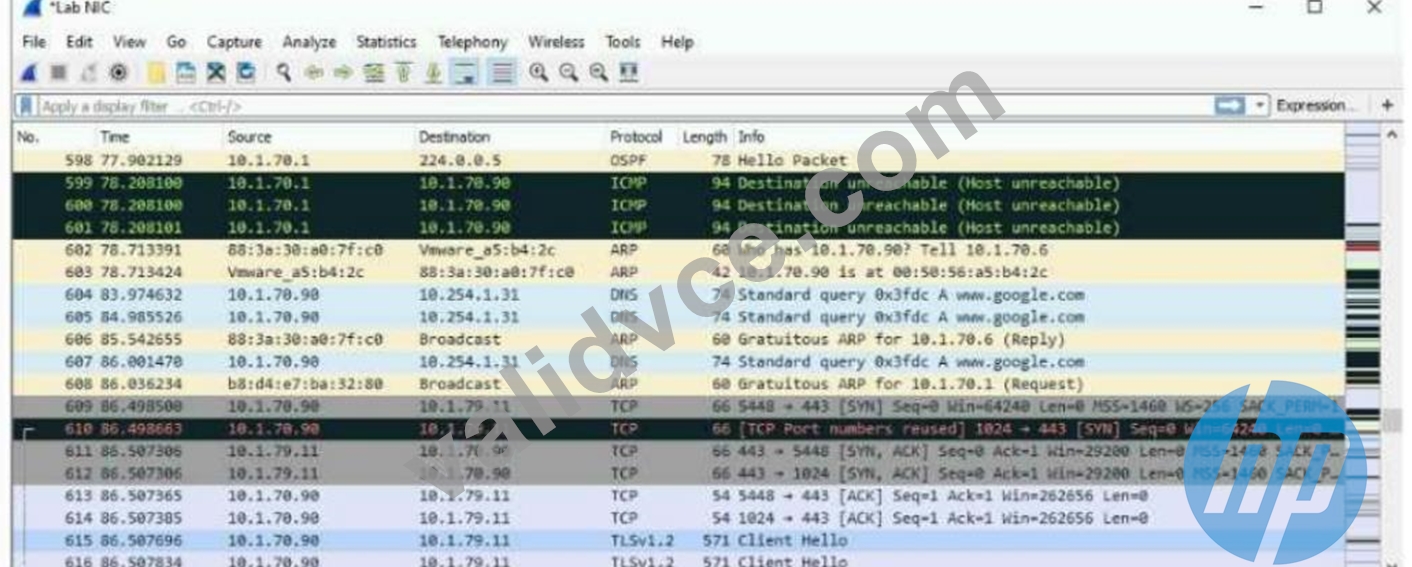
The exhibit shows a saved packet capture, which you have opened in Wireshark. You want to focus on the complete conversation between 10.1.70.90 and 10.1.79.11 that uses source port 5448.
What is a simple way to do this in Wireshark?
- A. Apply a capture filter that selects for both the 10.1.70.90 and 10.1.79.11 IP addresses.
- B. Apply a capture filter that selects for TCP port 5448.
- C. Click the Source column and then the Destination column to sort the packets into the desired order.
- D. Right-click one of the packets between those addresses and choose to follow the stream.
Answer: D
Explanation:
* Wireshark: Follow TCP Stream:
* Wireshark provides an intuitive feature to filter and display a complete TCP conversation.
* By right-clicking any packet within the conversation and selecting "Follow # TCP Stream", Wireshark isolates and displays the entire conversation.
* This feature allows you to view the communication in a simplified, sequential manner, including requests and responses.
* Option Analysis:
* Option A: Incorrect. Capture filters only apply during packet capturing, not for analyzing already saved packet captures.
* Option B: Incorrect. Sorting packets helps with organizing data but does not isolate a complete conversation.
* Option C: Incorrect. A capture filter for TCP port 5448 would have to be applied before capturing; it does not work for saved data.
* Option D: Correct. Right-clicking a packet and choosing "Follow TCP Stream" is the simplest way to display the full conversation between 10.1.70.90 and 10.1.79.11 on port 5448.
Steps in Wireshark to Follow a TCP Stream:
* Locate any packet within the desired conversation (e.g., between 10.1.70.90 and 10.1.79.11 on TCP port 5448).
* Right-click on the packet.
* Choose "Follow" # "TCP Stream".
* Wireshark will display the entire TCP conversation, including both directions of communication.
This feature is especially useful when troubleshooting or analyzing detailed interactions between hosts.
NEW QUESTION # 78
A company uses HPE Aruba Networking ClearPass Device Insight (CPDI) (the standalone application option). In the details for a generic device cluster, you see a recommendation for "Windows 8/10" with 70% accuracy.
What does this mean?
- A. CPDI has used MAC OUI to group these devices together. The average device's MAC address matches
70% of the "Windows 8/10" OUI. - B. CPDI has detected that these devices match about 70% of the system rule for defining "Windows 8/10" devices.
- C. CPDI has matched these devices against several, conflicting system rules. 70% of those rules are for
"Windows 8/10" devices. - D. CPDI has grouped this cluster with similar classified devices. 70% of those classified devices are
"Windows 8/10."
Answer: B
Explanation:
When HPE Aruba Networking ClearPass Device Insight (CPDI) shows a recommendation for "Windows 8
/10" with 70% accuracy for a generic device cluster, it means that CPDI has detected that these devices match about 70% of the system rule criteria for defining "Windows 8/10" devices. This percentage indicates the confidence level based on the observed characteristics and behavior of the devices, helping administrators understand the likelihood that these devices are indeed running Windows 8 or 10.
Reference: ClearPass Device Insight documentation provides details on how device classification and accuracy percentages are determined, explaining the matching process against system rules.
NEW QUESTION # 79
A company has wired VolP phones, which transmit tagged traffic and connect to AOS-CX switches. The company wants to tunnel the phones' traffic to an HPE Aruba Networking gateway for applying security policies.
What is part of the correct configuration on the AOS-CX switches?
- A. VLANs assigned to the VolP phones configured on the switch uplinks
- B. UBT mode set to VLAN extend
- C. A VXLAN VNI mapped to the VLAN assigned to the VolP phones
- D. A UBT reserved VLAN set to a VLAN dedicated for that purpose
Answer: D
Explanation:
To tunnel VoIP phone traffic from AOS-CX switches to an HPE Aruba Networking gateway, you need to configure a User-Based Tunneling (UBT) reserved VLAN on the switches. This VLAN is dedicatedfor tunneling purposes and ensures that the VoIP traffic is correctly identified and tunneled to the gateway where security policies can be applied.
1.UBT Configuration: Setting a UBT reserved VLAN ensures that the switch knows which VLAN to use for tunneling traffic to the gateway.
2.Traffic Tunneling: The reserved VLAN helps in segregating the VoIP traffic, ensuring it is handled securely and according to the configured policies at the gateway.
3.Policy Application: By tunneling the traffic, the gateway can apply advanced security policies to the VoIP traffic.
NEW QUESTION # 80
A ClearPass Policy Manager (CPPM) service includes these settings:
* Role Mapping Policy:
* Evaluate: Select first
* Rule 1 conditions:
* Authorization:AD:Groups EQUALS Managers
* Authentication:TEAP-Method-1-Status EQUALS Success
* Rule 1 role: manager
Rule 2 conditions:
* Authentication:TEAP-Method-1-Status EQUALS Success
* Rule 2 role: domain-comp
Default role: [Other]
Enforcement Policy:
* Evaluate: Select first
* Rule 1 conditions:
* Tips Role EQUALS manager AND Tips Role EQUALS domain-comp
* Rule 1 profile list: domain-manager
Rule 2 conditions:
* Tips Role EQUALS manager
* Rule 2 profile list: manager-only
Rule 3 conditions:
* Tips Role EQUALS domain-comp
* Rule 3 profile list: domain-only
Default profile: [Deny access]
A client is authenticated by the service. CPPM collects attributes indicating that the user is in the Contractors group, and the client passed both TEAP methods.
Which enforcement policy will be applied?
- A. [Deny Access Profile]
- B. domain-only
- C. manager-only
- D. domain-manager
Answer: A
Explanation:
1. Understanding the Role Mapping Evaluation:
* Role mapping is set to "Evaluate: Select first," meaning the first rule that matches the client attributes will determine the role(s) assigned.
* Contractors group: Since the client is in the Contractors group (not Managers), Rule 1 in the Role Mapping Policy does not match.
* TEAP-Method-1-Status EQUALS Success: This condition matches Rule 2, so the client is assigned the domain-comp role.
* No other rules match, so the default role [Other] is not applied.
2. Resulting Role from Role Mapping Policy:
* The client is assigned the domain-comp role.
3. Enforcement Policy Evaluation:
* Enforcement policy is also set to "Evaluate: Select first," so the first matching rule determines the enforcement profile.
* Rule 1 (Tips Role = manager AND domain-comp):
* The client only has the domain-comp role, not manager, so this rule does not match.
* Rule 2 (Tips Role = manager):
* The client does not have the manager role, so this rule does not match.
* Rule 3 (Tips Role = domain-comp):
* This rule matches the client's role, but it is not evaluated because the enforcement policy already skipped to the default action after failing the first two rules.
4. Default Enforcement Profile:
* Since no rule explicitly matches and the policy evaluation stops at the default, the default profile [Deny Access Profile] is applied.
Final Outcome:
The client is denied access because none of the matching rules satisfy the conditions.
References
* Aruba ClearPass Policy Manager Role Mapping and Enforcement Policies Guide.
* Role and Policy Evaluation Logic for ClearPass Authentication Services.
NEW QUESTION # 81
A company has HPE Aruba Networking APs running AOS-10 and managed by HPE Aruba Networking Central. The company also has AOS-CX switches. The security team wants you to capture traffic from a particular wireless client. You should capture this client's traffic over a 15-minute time period and then send the traffic to them in a PCAP file. What should you do?
- A. Access the CLI for the client's AP's switch. Set up a mirroring session between the AP's port and a management station running Wireshark.
- B. Go to the client's AP in HPE Aruba Networking Central. Use the "Security" page to run a packet capture.
- C. Access the CLI for the client's AP. Set up a mirroring session between its radio and a management station running Wireshark.
- D. Go to that client in HPE Aruba Networking Central. Use the "Live Events" page to run a packet capture.
Answer: B
Explanation:
* Packet Capture in Aruba Central:
* Aruba Central provides tools for remote packet captures directly from the APs.
* On the "Security" page for the AP, you can initiate a packet capture session, specifying the client device and capture duration.
* The traffic is captured into a PCAP file, which can be downloaded and analyzed using tools like Wireshark.
* Option Analysis:
* Option A: Incorrect. While possible via CLI, Aruba Central provides a simpler method for packet captures.
* Option B: Correct. Aruba Central's "Security" page allows you to capture and export client traffic efficiently.
* Option C: Incorrect. The "Live Events" page focuses on monitoring events, not packet captures.
* Option D: Incorrect. Port mirroring on the switch captures AP traffic but requires more manual configuration and does not isolate client-specific wireless traffic easily.
NEW QUESTION # 82
You have installed an HPE Aruba Networking Network Analytic Engine (NAE) script on an AOS-CX switch to monitor a particular function.
Which additional step must you complete to start the monitoring?
- A. Edit the script to define monitor parameters.
- B. Reboot the switch.
- C. Create an agent from the script.
- D. Enable NAE, which is disabled by default.
Answer: C
Explanation:
After installing an HPE Aruba Networking Network Analytic Engine (NAE) script on an AOS-CX switch, the additional step required to start the monitoring is to create an agent from the script. The agent is responsible for executing the script and collecting the monitoring data as defined by the script parameters.
1.Script Installation: Installing the script provides the logic and parameters for monitoring.
2.Agent Creation: Creating an agent from the script activates the monitoring process, allowing the NAE to begin tracking the specified function.
3.Operational Step: This step ensures that the monitoring logic is applied and the data collection starts as per the script's configuration.
Reference: Aruba AOS-CX documentation and Network Analytics Engine guides outline the process of script installation and the necessity of creating an agent to activate monitoring.
NEW QUESTION # 83
A company is implementing HPE Aruba Networking Wireless IDS/IPS (WIDS/WIPS) on its AOS-10 APs, which are managed in HPE Aruba Networking Central.
What is one requirement for enabling detection of rogue APs?
- A. One AM deployed for every one AP deployed
- B. A manual radio profile that enables non-regulatory channels
- C. A Foundation with Security license for each of the APs
- D. Each VLAN in the network assigned on at least one AP's or AM's port
Answer: C
Explanation:
To enable the detection of rogue APs with HPE Aruba Networking Wireless IDS/IPS (WIDS/WIPS) on AOS-
10 APs managed in HPE Aruba Networking Central, each AP must have a Foundation with Security license.
This license enables advanced security features, including rogue AP detection, which is crucial for maintaining a secure wireless environment and protecting against unauthorized access points.
Reference: Aruba's licensing documentation and WIDS/WIPS setup guides specify the need for appropriate licenses to activate security features such as rogue AP detection.
NEW QUESTION # 84
You are deploying a virtual Data Collector for use with HPE Aruba Networking ClearPass Device Insight (CPDI). You have identified VLAN 101 in the data center as the VLAN to which the Data Collector should connect to receive its IP address and connect to HPE Aruba Networking Central.
Which Data Collector virtual ports should you tell the virtual admins to connect to VLAN 101?
- A. The one with the highest MAC address
- B. The one with the lowest port ID
- C. The one with the lowest MAC address
- D. The one with the highest port ID
Answer: B
Explanation:
When deploying a virtual Data Collector for HPE Aruba Networking ClearPass Device Insight (CPDI), it is essential to ensure that the correct virtual port is connected to the designated VLAN. In this case, VLAN 101 is used to receive the IP address and connect to Aruba Central. The best practice is to use the virtual port with the lowest port ID. This is typically the primary port used for management and network connectivity in virtual environments, ensuring proper network integration and communication.
NEW QUESTION # 85
A company is using HPE Aruba Networking Central SD-WAN Orchestrator to establish a hub-spoke VPN between branch gateways (BGWs) at 1164 site and VPNCs at multiple data centers. What is part of the configuration that admins need to complete?
- A. At the global level, create default IPsec policies for the SD-WAN Orchestrator to use.
- B. In BGWs' and VPNCs' groups, create default IKE policies for the SD-WAN Orchestrator to use.
- C. In VPNCs' groups, establish VPN pools to control which branches connect to which VPNCs.
- D. In BGWs' groups, select the VPNCs to which to connect in a DC preference list.
Answer: D
Explanation:
* Hub-Spoke VPN Configuration:
* HPE Aruba Central SD-WAN Orchestrator enables hub-spoke topology where branch gateways (BGWs) connect to VPN concentrators (VPNCs) located at data centers.
* A key step in configuring this is defining which VPNCs the BGWs will prefer for connectivity.
* The DC Preference List is configured in the BGW groups to prioritize the data centers to which BGWs connect.
* Option Analysis:
* Option A: Incorrect. VPN pools control IP allocation, not which branches connect to VPNCs.
* Option B: Incorrect. IKE policies define key exchange mechanisms but are not part of the connection preference process.
* Option C: Correct. Admins configure a DC preference list in BGW groups to determine connectivity priorities with VPNCs.
* Option D: Incorrect. IPsec policies define encryption parameters at a global level, but this is not specific to the hub-spoke connection configuration.
NEW QUESTION # 86
A company has HPE Aruba Networking APs (AOS-10), which authenticate clients to HPE Aruba Networking ClearPass Policy Manager (CPPM). CPPM is set up to receive a variety of information about clients' profile and posture. New information can mean that CPPM should change a client's enforcement profile.
What should you set up on the APs to help the solution function correctly?
- A. In the security settings, configure dynamic denylisting.
- B. In the RADIUS server settings for CPPM, enable Dynamic Authorization.
- C. In the WLAN profiles, enable interim RADIUS accounting.
- D. In the RADIUS server settings for CPPM, enable querying the authentication status.
Answer: B
Explanation:
To ensure that HPE Aruba Networking APs (AOS-10) properly interact with HPE Aruba Networking ClearPass Policy Manager (CPPM) and dynamically update a client's enforcement profile based on new profile and posture information, you should enable Dynamic Authorization in the RADIUS server settings for CPPM. This allows ClearPass to send Change of Authorization (CoA) requests to the APs, prompting them to reapply the appropriate enforcement profiles based on updated information.
1.Dynamic Authorization: Enabling this feature allows ClearPass to dynamically push changes to the APs whenever there is new relevant information about a client's profile or posture.
2.Change of Authorization (CoA): This mechanism ensures that clients are assigned the correct enforcement profiles in real-time, based on the latest data.
3.Enhanced Policy Enforcement: This setup helps in maintaining accurate and up-to-date policy enforcement for clients on the network.
Reference: ClearPass and AOS-10 documentation on RADIUS server settings and dynamic authorization explain the process and benefits of enabling Dynamic Authorization for real-time policy updates.
NEW QUESTION # 87
You manage AOS-10 APs with HPE Aruba Networking Central. A role is configured on these APs with these rules (in order):
* Allow UDP on port 67 to any destination
* Allow any to network 10.1.4.0/23
* Deny any to network 10.1.0.0/18 + log
* Deny any to network 10.0.0.0/8
* Allow any to any destination
You add this new rule immediately before rule 4:
* Deny SSH to network 10.1.0.0/21 + denylist
After this change, what happens when a client assigned to this role sends SSH traffic to 10.1.7.12?
- A. The traffic is dropped (without any logging or further action against the client)
- B. The traffic is dropped and logged
- C. The traffic is permitted
- D. The traffic is dropped, and the client is denylisted
Answer: B
Explanation:
Aruba firewall / role access rules are evaluated top-down, first-match wins; once a rule matches, no later rules are processed.
Let's walk the packet through the ordered rules:
* The traffic is SSH, not UDP/67 # rule 1 does not match.
* Destination 10.1.7.12 is not in 10.1.4.0/23 # rule 2 does not match.
* 10.1.7.12 is in 10.1.0.0/18 # rule 3 matches first.
* Rule 3 action: Deny any to 10.1.0.0/18 + log.
* Because rule 3 already matched, the later "Deny SSH to 10.1.0.0/21 + denylist" rule is never evaluated, so no denylist is applied.
Aruba documentation for session ACLs and firewall rules explicitly states that rules are evaluated from top to bottom and "the first match terminates further evaluation," and logging/denylist flags on a rule are applied only when that specific rule matches.
So the outcome is: the SSH traffic is dropped and logged, but the client is not denylisted # Option B.
NEW QUESTION # 88
A company lacks visibility into the many different types of user and loT devices deployed in its internal network, making it hard for the security team to address those devices.
Which HPE Aruba Networking solution should you recommend to resolve this issue?
- A. HPE Aruba Networking Network Analytics Engine (NAE)
- B. HPE Aruba Networking ClearPass Device Insight (CPDI)
- C. HPE Aruba Networking Mobility Conductor
- D. HPE Aruba Networking ClearPass OnBoard
Answer: B
NEW QUESTION # 89
A company wants you to integrate HPE Aruba Networking ClearPass Policy Manager (CPPM) with HPE Aruba Networking ClearPass Device Insight (CPDI).
What is one aspect of the integration that you should explain?
- A. CPPM can submit profile information to CPDI, but if CPDI derives a different classification, CPDI takes precedence.
- B. CPDI must be configured as an audit server on CPPM for the integration to be successful.
- C. CPDI must have security analysis disabled on it for the integration to be successful.
- D. CPPM no longer supports any Device Profiler features and relies on CPDI for this profile information.
Answer: A
Explanation:
When integrating ClearPass Policy Manager (CPPM) with ClearPass Device Insight (CPDI), it is important to understand how device profiling and classification work between the two solutions:
1. CPPM and CPDI Integration Overview
* CPPM is primarily used for access control and policy enforcement, while CPDI specializes in device profiling and classification through advanced analytics and machine learning.
* Integration allows CPPM to leverage CPDI's enhanced profiling capabilities for more accurate device identification and policy enforcement.
2. Detailed Analysis of Each Option
A: CPPM no longer supports any Device Profiler features and relies on CPDI for this profile information:
* Incorrect: CPPM still supports its own basic device profiling features and can operate independently.
However, when integrated with CPDI, CPPM can use CPDI's advanced profiling capabilities as a supplement.
B: CPDI must be configured as an audit server on CPPM for the integration to be successful:
* Incorrect: CPDI is not configured as an audit server on CPPM. Integration is achieved via API integration and communication between the two solutions, not through audit server settings.
C: CPDI must have security analysis disabled on it for the integration to be successful:
* Incorrect: Security analysis does not need to be disabled for integration. In fact, CPDI's security analysis enhances the classification process by identifying anomalous behaviors.
D: CPPM can submit profile information to CPDI, but if CPDI derives a different classification, CPDI takes precedence:
* Correct:
* CPPM and CPDI exchange profile data, but CPDI has more advanced device classification capabilities due to its machine learning-based engine.
* When CPDI derives a different classification than CPPM, CPDI's classification is considered more accurate and takes precedence.
* This ensures that policies are based on the most reliable device classification.
References
* Aruba ClearPass Policy Manager and Device Insight Integration Guide.
* ClearPass Device Profiling and Classification Documentation.
* Best Practices for CPPM and CPDI Integration in Network Security.
NEW QUESTION # 90
A security team needs to track a device's communication patterns and identify patterns such as how many destinations the device is accessing.
Which Aruba solution can show this information at a glance?
- A. HPE Aruba Networking ClearPass Insight Endpoints and Network Dashboards
- B. AOS-CX Analytics Dashboard using the system-installed NAE agent
- C. HPE Aruba Networking ClearPass Policy Manager (CPPM) live monitoring Access Tracker
- D. HPE Aruba Networking ClearPass Device Insight (CPDI) under a device's network activity
Answer: D
Explanation:
HPE Aruba Networking ClearPass Device Insight (CPDI) can show detailed information about a device's communication patterns, including how many destinations the device is accessing. CPDI provides comprehensive visibility into the behavior and activity of devices on the network, allowing the security team to track and analyze communication patterns at a glance. This information is critical for identifying anomalies and potential security threats.
NEW QUESTION # 91
Which statement describes Zero Trust Security?
- A. Companies that support remote workers cannot achieve zero trust security and must determine if the benefits outweigh the cost.
- B. Companies should focus on protecting their resources rather than on protecting the boundaries of their internal network.
- C. Companies must apply the same access controls to all users, regardless of identity.
- D. Companies can achieve zero trust security by strengthening their perimeter security to detect a wider range of threats.
Answer: B
Explanation:
Zero Trust Security is a security model that operates on the principle that no entity, whether inside or outside the network, should be trusted by default. Instead, every access request is thoroughly verified before granting access to resources. This model emphasizes protecting resources rather than merely securing the network perimeter, acknowledging that threats can originate both inside and outside the network.
1.Resource Protection: Zero Trust focuses on securing individual resources, assuming that threats can bypass traditional perimeter defenses.
2.Verification: Every access request is authenticated and authorized regardless of the source, ensuring that only legitimate users can access sensitive resources.
3.Modern Security Approach: This model aligns with the evolving threat landscape where insider threats and advanced persistent threats are common.
NEW QUESTION # 92
A company assigns a different block of VLAN IDs to each of its access layer AOS-CX switches. The switches run version 10.07. The IDs are used for standard purposes, such as for employees, VolP phones, and cameras. The company wants to apply 802.1X authentication to HPE Aruba Networking ClearPass Policy Manager (CPPM) and then steer clients to the correct VLANs for local forwarding.
What can you do to simplify setting up this solution?
- A. Change the VLAN IDs across the AOS-CX switches so that they are consistent.
- B. Avoid configuring the VLAN in the role; use trunk VLANs to assign multiple VLANs to the port instead.
- C. Assign consistent names to VLANs of the same type across the AOS-CX switches and have user-roles reference names.
- D. Use the trunk allowed VLAN setting to assign multiple VLAN IDs to the same role.
Answer: C
Explanation:
To simplify the setup of 802.1X authentication with HPE Aruba Networking ClearPass Policy Manager (CPPM) and ensure clients are steered to the correct VLANs for local forwarding, you should assign consistent names to VLANs of the same type across the AOS-CX switches and have user-roles reference these names. This approach allows for a more straightforward configuration and management process, as the user roles can apply consistent policies based on VLAN names rather than specific IDs. It also helps in maintaining clarity and reducing errors in VLAN assignments across different switches.
NEW QUESTION # 93
You are setting up HPE Aruba Networking SSE to prohibit users from uploading and downloading files from Dropbox. What is part of the process?
- A. Deploying a connector that can reach the remote users
- B. Installing the HPE Aruba Networking SSE root certificate on clients
- C. Deploying a connector that can reach Dropbox
- D. Adding a web category that includes Dropbox
Answer: D
Explanation:
Comprehensive Detailed Explanation
To prohibit users from uploading and downloading files from Dropbox using HPE Aruba Networking SSE (Secure Service Edge), you need to configure web access policies. This typically involves:
* Adding a web category to the SSE configuration that includes Dropbox.
* The SSE solution uses category-based filtering to block access to specific applications or services, such as Dropbox, based on their classification.
Other Options:
* B. Installing the SSE root certificate is required for enabling SSL inspection, but this does not directly control access to Dropbox.
* C and D. Deploying a connector is not necessary for this purpose as the enforcement is done via SSE policies, not by directly interfacing with Dropbox or remote users.
References
* Aruba Networking SSE documentation on web filtering policies.
* HPE Aruba SSE Application Control Best Practices Guide.
NEW QUESTION # 94
......
HP HPE7-A02 exam is a vendor-neutral certification exam that is recognized globally. It is a comprehensive exam that tests an individual's knowledge of network security concepts and practices. HPE7-A02 exam is designed to assess a candidate's ability to design, implement, and manage secure enterprise networks, and to identify and mitigate potential security risks. Passing the HP HPE7-A02 exam not only validates an individual's expertise in network security but also helps in career advancement by opening up new job opportunities and higher salaries.
Updated Official licence for HPE7-A02 Certified by HPE7-A02 Dumps PDF: https://www.validvce.com/HPE7-A02-exam-collection.html
New 2025 Realistic HPE7-A02 Dumps Test Engine Exam Questions in here: https://drive.google.com/open?id=1rsJjOkeVmSx6-X9ajVl80YZCMuGSrYSZ
