

The Best HashiCorp TA-003-P Study Guides and Dumps of 2024
Top HashiCorp TA-003-P Exam Audio Study Guide! Practice Questions Edition
NEW QUESTION # 68
Which of the following command would be use to access all of the attributes and details of a resource managed by Terraform?
- A. Terraform state show ' provider_type_name
- B. Terraform state list
- C. Terraform get provider_type_name
- D. Terraform state list provider_type_name
Answer: A
Explanation:
This is the command that you would use to access all of the attributes and details of a resource managed by Terraform, by providing the resource address as an argument. For example, terraform state show 'aws_instance.example' will show you all the information about the AWS instance named example.
NEW QUESTION # 69
What is one disadvantage of using dynamic blocks in Terraform?
- A. They make configuration harder to read and understand
- B. They cannot be used to loop through a list of values
- C. Terraform will run more slowly
- D. Dynamic blocks can construct repeatable nested blocks
Answer: A
Explanation:
This is one disadvantage of using dynamic blocks in Terraform, as they can introduce complexity and reduce readability of the configuration. The other options are either advantages or incorrect statements.
NEW QUESTION # 70
The public Terraform Module Registry is free to use.
- A. True
- B. False
Answer: A
Explanation:
The public Terraform Module Registry is free to use, as it is a public service that hosts thousands of self- contained packages called modules that are used to provision infrastructure. You can browse, use, and publish modules to the registry without any cost.
NEW QUESTION # 71
You are working on some new application features and you want to spin up a copy of your production deployment to perform some quick tests.
In order to avoid having to configure a new state backend, what open source Terraform feature would allow you create multiple states but still be associated with your current code?
- A. Terraform data sources
- B. Terraform modules
- C. None of the above
- D. Terraform local values
- E. Terraform workspaces
Answer: E
Explanation:
Terraform workspaces allow you to create multiple states but still be associated with your current code.
Workspaces are like "environments" (e.g. staging, production) for the same configuration. You can use workspaces to spin up a copy of your production deployment for testing purposes without having to configure a new state backend. Terraform data sources, local values, and modules are not features that allow you to create multiple states. Reference = Workspaces and How to Use Terraform Workspaces
NEW QUESTION # 72
You add a new provider to your configuration and immediately run terraform apply in the CD using the local backend.
Why does the apply fail?
- A. Terraform needs you to format your code according to best practices first
- B. The Terraform CD needs you to log into Terraform Cloud first
- C. Terraform requires you to manually run terraform plan first
- D. Terraform needs to install the necessary plugins first
Answer: D
Explanation:
The reason why the apply fails after adding a new provider to the configuration and immediately running terraform apply in the CD using the local backend is because Terraform needs to install the necessary plugins first. Terraform providers are plugins that Terraform uses to interact with various cloud services and other APIs. Each provider has a source address that determines where to download it from. When Terraform encounters a new provider in the configuration, it needs to run terraform init first to install the provider plugins in a local directory. Without the plugins, Terraform cannot communicate with the provider and perform the desired actions. Reference = [Provider Requirements], [Provider Installation]
NEW QUESTION # 73
You have used Terraform lo create an ephemeral development environment in the (loud and are now ready to destroy all the Infrastructure described by your Terraform configuration To be safe, you would like to first see all the infrastructure that Terraform will delete.
Which command should you use to show all of the resources that mil be deleted? Choose two correct answers.
- A. Run terraform show :destroy
- B. Run terraform state rm '
- C. Run terraform plan .destory
- D. Run terraform destroy and it will first output all the resource that will be deleted before prompting for approval
Answer: C,D
Explanation:
To see all the resources that Terraform will delete, you can use either of these two commands: terraform destroy will show the plan of destruction and ask for your confirmation before proceeding. You can cancel the command if you do not want to destroy the resources.
terraform plan -destroy will show the plan of destruction without asking for confirmation. You can use this command to review the changes before running terraform destroy. Reference = : Destroy Infrastructure :
Plan Command: Options
NEW QUESTION # 74
Why does this backend configuration not follow best practices?
- A. You should not store credentials in Terraform configuration
- B. The backend configuration should contain multiple credentials so that more than one user can execute terraform plan and terraform apply
- C. An alias meta-argument should be included in backend blocks whenever possible
- D. You should use the local enhanced storage backend whenever possible
Answer: A
Explanation:
This is a bad practice, as it exposes your credentials to anyone who can access your configuration files or state files. You should use environment variables, credential files, or other mechanisms to provide credentials to Terraform.
NEW QUESTION # 75
Setting the TF_LOG environment variable to DEBUG causes debug messages to be logged into stdout.
- A. True
- B. False
Answer: A
Explanation:
Setting the TF_LOG environment variable to DEBUG causes debug messages to be logged into stdout, along with other log levels such as TRACE, INFO, WARN, and ERROR. This can be useful for troubleshooting or debugging purposes.
NEW QUESTION # 76
Which of the following is not a valid Terraform variable type?
- A. nap
- B. string
- C. array
- D. list
Answer: C
Explanation:
This is not a valid Terraform variable type. The other options are valid variable types that can store different kinds of values2.
NEW QUESTION # 77
If a DevOps team adopts AWS CloudFormation as their standardized method for provisioning public cloud resoruces, which of the following scenarios poses a challenge for this team?
- A. The DevOps team is tasked with automating a manual, web console-based provisioning.
- B. The organization decides to expand into Azure wishes to deploy new infrastructure
- C. The team is asked to manage a new application stack built on AWS-native services
- D. The team is asked to build a reusable code based that can deploy resources into any AWS region
Answer: B
Explanation:
This is the scenario that poses a challenge for this team, if they adopt AWS CloudFormation as their standardized method for provisioning public cloud resources, as CloudFormation only supports AWS services and resources, and cannot be used to provision infrastructure on other cloud platforms such as Azure.
NEW QUESTION # 78
Terraform providers are part of the Terraform core binary.
- A. True
- B. False
Answer: B
Explanation:
Terraform providers are not part of the Terraform core binary. Providers are distributed separately from Terraform itself and have their own release cadence and version numbers. Providers are plugins that Terraform uses to interact with various APIs, such as cloud providers, SaaS providers, and other services. You can find and install providers from the Terraform Registry, which hosts providers for most major infrastructure platforms. You can also load providers from a local mirror or cache, or develop your own custom providers. To use a provider in your Terraform configuration, you need to declare it in the provider requirements block and optionally configure its settings in the provider block. Reference = :
Providers - Configuration Language | Terraform : Terraform Registry - Providers Overview | Terraform
NEW QUESTION # 79
If you update the version constraint in your Terraform configuration, Terraform will update your lock file the next time you run terraform Init.
- A. True
- B. False
Answer: A
Explanation:
If you update the version constraint in your Terraform configuration, Terraform will update your lock file the next time you run terraform init3. This will ensure that you use the same provider versions across different machines and runs.
NEW QUESTION # 80
Which method for sharing Terraform configurations fulfills the following criteria:
1. Keeps the configurations confidential within your organization
2. Support Terraform's semantic version constrains
3. Provides a browsable directory
- A. Terraform Cloud private registry
- B. Subfolder within a workspace
- C. Public Terraform module registry
- D. Generic git repository
Answer: A
Explanation:
This is the method for sharing Terraform configurations that fulfills the following criteria:
Keeps the configurations confidential within your organization
Supports Terraform's semantic version constraints
Provides a browsable directory
The Terraform Cloud private registry is a feature of Terraform Cloud that allows you to host and manage your own modules within your organization, and use them in your Terraform configurations with versioning and access control.
NEW QUESTION # 81
What is the Terraform style convention for indenting a nesting level compared to the one above it?
- A. With a tab
- B. With two spaces
- C. With four spaces
- D. With three spaces
Answer: B
Explanation:
This is the Terraform style convention for indenting a nesting level compared to the one above it. The other options are not consistent with the Terraform style guide.
NEW QUESTION # 82
Which of these statements about Terraform Cloud workspaces is false?
- A. Plans and applies can be triggered via version control system integrations
- B. They have role-based access controls
- C. You must use the CLI to switch between workspaces
- D. They can securely store cloud credentials
Answer: C
Explanation:
The statement that you must use the CLI to switch between workspaces is false. Terraform Cloud workspaces are different from Terraform CLI workspaces. Terraform Cloud workspaces are required and represent all of the collections of infrastructure in an organization. They are also a major component of role-based access in Terraform Cloud. You can grant individual users and user groups permissions for one or more workspaces that dictate whether they can manage variables, perform runs, etc. You can create, view, and switch between Terraform Cloud workspaces using the Terraform Cloud UI, the Workspaces API, or the Terraform Enterprise Provider5. Terraform CLI workspaces are optional and allow you to create multiple distinct instances of a single configuration within one working directory. They are useful for creating disposable environments for testing or experimenting without affecting your main or production environment. You can create, view, and switch between Terraform CLI workspaces using the terraform workspace command6. The other statements about Terraform Cloud workspaces are true.
They have role-based access controls that allow you to assign permissions to users and teams based on their roles and responsibilities. You can create and manage roles using the Teams API or the Terraform Enterprise Provider7. Plans and applies can be triggered via version control system integrations that allow you to link your Terraform Cloud workspaces to your VCS repositories. You can configure VCS settings, webhooks, and branch tracking to automate your Terraform Cloud workflow8. They can securely store cloud credentials as sensitive variables that are encrypted at rest and only decrypted when needed. You can manage variables using the Terraform Cloud UI, the Variables API, or the Terraform Enterprise Provider9. Reference = [Workspaces]5, [Terraform CLI Workspaces]6, [Teams and Organizations]7, [VCS Integration]8, [Variables]9
NEW QUESTION # 83
Which of the following is not a key principle of infrastructure as code?
- A. Idempotence
- B. Golden images
- C. Versioned infrastructure
- D. Self-describing infrastructure
Answer: B
Explanation:
The key principle of infrastructure as code that is not listed among the options is golden images. Golden images are pre-configured, ready-to-use virtual machine images that contain a specific set of software and configuration. They are often used to create multiple identical instances of the same environment, such as for testing or production. However, golden images are not a principle of infrastructure as code, but rather a technique that can be used with or without infrastructure as code.
The other options are all key principles of infrastructure as code, as explained below:
Self-describing infrastructure: This means that the infrastructure is defined in code that describes its desired state, rather than in scripts that describe the steps to create it. This makes the infrastructure easier to understand, maintain, and reproduce.
Idempotence: This means that applying the same infrastructure code multiple times will always result in the same state, regardless of the initial state. This makes the infrastructure consistent and predictable, and avoids errors or conflicts caused by repeated actions.
Versioned infrastructure: This means that the infrastructure code is stored in a version control system, such as Git, that tracks the changes and history of the code. This makes the infrastructure code reusable, auditable, and collaborative, and enables practices such as branching, merging, and rollback.
Reference = [Introduction to Infrastructure as Code with Terraform], [Infrastructure as Code in a Private or Public Cloud]
NEW QUESTION # 84
Which backend does the Terraform CU use by default?
- A. Depends on the cloud provider configured
- B. Local
- C. Terraform Cloud
- D. Remote
- E. HTTP
Answer: B
Explanation:
This is the backend that the Terraform CLI uses by default, unless you specify a different backend in your configuration. The local backend stores the state file in a local file named terraform. tfstate, which can be used to track and manage the state of your infrastructure.
NEW QUESTION # 85
You are writing a child Terraform module that provisions an AWS instance. You want to reference the IP address returned by the child module in the root configuration. You name the instance resource
"main'.
Which of these is the correct way to define the output value?
- A.

- B.

- C.
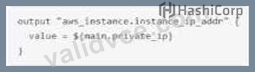
- D.

Answer: A
NEW QUESTION # 86
What does Terraform not reference when running a terraform apply -refresh-only?
- A. Cloud provider
- B. State file
- C. Credentials
- D. Terraform resource definitions in configuration files
Answer: D
Explanation:
When running a terraform apply -refresh-only, Terraform does not reference the configuration files, but only the state file, credentials, and cloud provider. The purpose of this command is to update the state file with the current status of the real resources, without making any changes to them1.
NEW QUESTION # 87
You have to initialize a Terraform backend before it can be configured.
- A. True
- B. False
Answer: B
Explanation:
You can configure a backend in your Terraform code before initializing it. Initializing a backend will store the state file remotely and enable features like locking and workspaces. Reference = [Terraform Backends]
NEW QUESTION # 88
Which of the following is not a benefit of adopting infrastructure as code?
- A. A Graphical User Interface
- B. Reusability of code
- C. Versioning
- D. Automation
Answer: A
Explanation:
Infrastructure as Code (IaC) provides several benefits, including the ability to version control infrastructure, reuse code, and automate infrastructure management. However, IaC is typically associated with declarative configuration files and does not inherently provide a graphical user interface (GUI). A GUI is a feature that may be provided by specific tools or platforms built on top of IaC principles but is not a direct benefit of IaC itself1.
Reference = The benefits of IaC can be verified from the official HashiCorp documentation on "What is Infrastructure as Code with Terraform?" provided by HashiCorp Developer1.
NEW QUESTION # 89
A terraform apply can not _________ infrastructure.
- A. destroy
- B. change
- C. import
- D. provision
Answer: C
Explanation:
The terraform import command is used to import existing infrastructure into Terraform's state. This allows Terraform to manage and destroy the imported infrastructure as part of the configuration. The terraform import command does not modify the configuration, so the imported resources must be manually added to the configuration after the import. Reference = [Importing Infrastructure]
NEW QUESTION # 90
How can you trigger a run in a Terraform Cloud workspace that is connected to a Version Control System (VCS) repository?
- A. Only Terraform Cloud organization owners can approve plans in VCS connected workspaces
- B. Only Terraform Cloud organization owners can set workspace variables on VCS connected workspaces
- C. Commit a change to the VCS working directory and branch that the Terraform Cloud workspace is connected to
- D. Only members of a VCS organization can open a pull request against repositories that are connected to Terraform Cloud workspaces
Answer: C
Explanation:
This will trigger a run in the Terraform Cloud workspace, which will perform a plan and apply operation on the infrastructure defined by the Terraform configuration files in the VCS repository.
NEW QUESTION # 91
terraform validate confirms that your infrastructure matches the Terraform state file.
- A. True
- B. False
Answer: B
Explanation:
terraform validate does not confirm that your infrastructure matches the Terraform state file. It only checks whether the configuration files in a directory are syntactically valid and internally consistent3. To confirm that your infrastructure matches the Terraform state file, you need to use terraform plan or terraform apply with the -refresh-only option.
NEW QUESTION # 92
Where does the Terraform local backend store its state?
- A. In the terraform,tfstate file
- B. In the terraform file
- C. In the /tmp directory
- D. In the user's terraform,state file
Answer: A
Explanation:
This is where the Terraform local backend stores its state, by default, unless you specify a different file name or location in your configuration. The local backend is the simplest backend type that stores the state file on your local disk.
NEW QUESTION # 93
......
Valid TA-003-P Exam Updates - 2024 Study Guide: https://www.validvce.com/TA-003-P-exam-collection.html
TA-003-P Certification - The Ultimate Guide: https://drive.google.com/open?id=1CpLlcSlqeLrddp4pwnAeA32V92WWjSPl
