

The New Associate-Developer-Apache-Spark-3.5 2025 Updated Verified Study Guides & Best Courses
Authentic Associate-Developer-Apache-Spark-3.5 Exam Dumps PDF - 2025 Updated
NEW QUESTION # 24
Given the following code snippet inmy_spark_app.py:
What is the role of the driver node?
- A. The driver node stores the final result after computations are completed by worker nodes
- B. The driver node orchestrates the execution by transforming actions into tasks and distributing them to worker nodes
- C. The driver node holds the DataFrame data and performs all computations locally
- D. The driver node only provides the user interface for monitoring the application
Answer: B
Explanation:
Comprehensive and Detailed Explanation From Exact Extract:
In the Spark architecture, the driver node is responsible for orchestrating the execution of a Spark application.
It converts user-defined transformations and actions into a logical plan, optimizes it into a physical plan, and then splits the plan into tasks that are distributed to the executor nodes.
As per Databricks and Spark documentation:
"The driver node is responsible for maintaining information about the Spark application, responding to a user's program or input, and analyzing, distributing, and scheduling work across the executors." This means:
Option A is correct because the driver schedules and coordinates the job execution.
Option B is incorrect because the driver does more than just UI monitoring.
Option C is incorrect since data and computations are distributed across executor nodes.
Option D is incorrect; results are returned to the driver but not stored long-term by it.
Reference: Databricks Certified Developer Spark 3.5 Documentation # Spark Architecture # Driver vs Executors.
NEW QUESTION # 25
Given a CSV file with the content:
And the following code:
from pyspark.sql.types import *
schema = StructType([
StructField("name", StringType()),
StructField("age", IntegerType())
])
spark.read.schema(schema).csv(path).collect()
What is the resulting output?
- A. [Row(name='alladin', age=20)]
- B. The code throws an error due to a schema mismatch.
- C. [Row(name='bambi', age=None), Row(name='alladin', age=20)]
- D. [Row(name='bambi'), Row(name='alladin', age=20)]
Answer: C
Explanation:
Comprehensive and Detailed Explanation From Exact Extract:
In Spark, when a CSV row does not match the provided schema, Spark does not raise an error by default.
Instead, it returnsnullfor fields that cannot be parsed correctly.
In the first row,"hello"cannot be cast to Integer for theagefield # Spark setsage=None In the second row,"20"is a valid integer #age=20 So the output will be:
[Row(name='bambi', age=None), Row(name='alladin', age=20)]
Final Answer: C
NEW QUESTION # 26
The following code fragment results in an error:
@F.udf(T.IntegerType())
def simple_udf(t: str) -> str:
return answer * 3.14159
Which code fragment should be used instead?
- A. @F.udf(T.IntegerType())
def simple_udf(t: float) -> float:
return t * 3.14159 - B. @F.udf(T.IntegerType())
def simple_udf(t: int) -> int:
return t * 3.14159 - C. @F.udf(T.DoubleType())
def simple_udf(t: float) -> float:
return t * 3.14159 - D. @F.udf(T.DoubleType())
def simple_udf(t: int) -> int:
return t * 3.14159
Answer: C
Explanation:
Comprehensive and Detailed Explanation:
The original code has several issues:
It references a variable answer that is undefined.
The function is annotated to return a str, but the logic attempts numeric multiplication.
The UDF return type is declared as T.IntegerType() but the function performs a floating-point operation, which is incompatible.
Option B correctly:
Uses DoubleType to reflect the fact that the multiplication involves a float (3.14159).
Declares the input as float, which aligns with the multiplication.
Returns a float, which matches both the logic and the schema type annotation.
This structure aligns with how PySpark expects User Defined Functions (UDFs) to be declared:
"To define a UDF you must specify a Python function and provide the return type using the relevant Spark SQL type (e.g., DoubleType for float results)." Example from official documentation:
from pyspark.sql.functions import udf
from pyspark.sql.types import DoubleType
@udf(returnType=DoubleType())
def multiply_by_pi(x: float) -> float:
return x * 3.14159
This makes Option B the syntactically and semantically correct choice.
NEW QUESTION # 27
A data engineer wants to create an external table from a JSON file located at/data/input.jsonwith the following requirements:
Create an external table namedusers
Automatically infer schema
Merge records with differing schemas
Which code snippet should the engineer use?
Options:
- A. CREATE EXTERNAL TABLE users USING json OPTIONS (path '/data/input.json', mergeSchema
'true') - B. CREATE EXTERNAL TABLE users USING json OPTIONS (path '/data/input.json', schemaMerge
'true') - C. CREATE TABLE users USING json OPTIONS (path '/data/input.json')
- D. CREATE EXTERNAL TABLE users USING json OPTIONS (path '/data/input.json')
Answer: A
Explanation:
To create an external table and enable schema merging, the correct syntax is:
CREATEEXTERNALTABLEusers
USINGjson
OPTIONS (
path'/data/input.json',
mergeSchema'true'
)
mergeSchemais the correct option key (notschemaMerge)
EXTERNALallows Spark to query files without managing their lifecycle
Reference:Spark SQL DDL - JSON and Schema Merging
NEW QUESTION # 28
A data scientist is working with a Spark DataFrame called customerDF that contains customer information.
The DataFrame has a column named email with customer email addresses. The data scientist needs to split this column into username and domain parts.
Which code snippet splits the email column into username and domain columns?
- A. customerDF.select(
col("email").substr(0, 5).alias("username"),
col("email").substr(-5).alias("domain")
) - B. customerDF.withColumn("username", split(col("email"), "@").getItem(0)) \
.withColumn("domain", split(col("email"), "@").getItem(1)) - C. customerDF.withColumn("username", substring_index(col("email"), "@", 1)) \
.withColumn("domain", substring_index(col("email"), "@", -1)) - D. customerDF.select(
regexp_replace(col("email"), "@", "").alias("username"),
regexp_replace(col("email"), "@", "").alias("domain")
)
Answer: B
Explanation:
Comprehensive and Detailed Explanation From Exact Extract:
Option B is the correct and idiomatic approach in PySpark to split a string column (like email) based on a delimiter such as "@".
The split(col("email"), "@") function returns an array with two elements: username and domain.
getItem(0) retrieves the first part (username).
getItem(1) retrieves the second part (domain).
withColumn() is used to create new columns from the extracted values.
Example from official Databricks Spark documentation on splitting columns:
from pyspark.sql.functions import split, col
df.withColumn("username", split(col("email"), "@").getItem(0)) \
withColumn("domain", split(col("email"), "@").getItem(1))
##Why other options are incorrect:
A uses fixed substring indices (substr(0, 5)), which won't correctly extract usernames and domains of varying lengths.
C uses substring_index, which is available but less idiomatic for splitting emails and is slightly less readable.
D removes "@" from the email entirely, losing the separation between username and domain, and ends up duplicating values in both fields.
Therefore, Option B is the most accurate and reliable solution according to Apache Spark 3.5 best practices.
NEW QUESTION # 29
A Spark DataFramedfis cached using theMEMORY_AND_DISKstorage level, but the DataFrame is too large to fit entirely in memory.
What is the likely behavior when Spark runs out of memory to store the DataFrame?
- A. Spark duplicates the DataFrame in both memory and disk. If it doesn't fit in memory, the DataFrame is stored and retrieved from the disk entirely.
- B. Spark splits the DataFrame evenly between memory and disk, ensuring balanced storage utilization.
- C. Spark will store as much data as possible in memory and spill the rest to disk when memory is full, continuing processing with performance overhead.
- D. Spark stores the frequently accessed rows in memory and less frequently accessed rows on disk, utilizing both resources to offer balanced performance.
Answer: C
Explanation:
Comprehensive and Detailed Explanation From Exact Extract:
When using theMEMORY_AND_DISKstorage level, Spark attempts to cache as much of the DataFrame in memory as possible. If the DataFrame does not fit entirely in memory, Spark will store the remaining partitions on disk. This allows processing to continue, albeit with a performance overhead due to disk I/O.
As per the Spark documentation:
"MEMORY_AND_DISK: It stores partitions that do not fit in memory on disk and keeps the rest in memory.
This can be useful when working with datasets that are larger than the available memory."
- Perficient Blogs: Spark - StorageLevel
This behavior ensures that Spark can handle datasets larger than the available memory by spilling excess data to disk, thus preventing job failures due to memory constraints.
NEW QUESTION # 30
Which configuration can be enabled to optimize the conversion between Pandas and PySpark DataFrames using Apache Arrow?
- A. spark.conf.set("spark.sql.execution.arrow.pyspark.enabled", "true")
- B. spark.conf.set("spark.sql.arrow.pandas.enabled", "true")
- C. spark.conf.set("spark.sql.execution.arrow.enabled", "true")
- D. spark.conf.set("spark.pandas.arrow.enabled", "true")
Answer: A
Explanation:
Comprehensive and Detailed Explanation From Exact Extract:
Apache Arrow is used under the hood to optimize conversion between Pandas and PySpark DataFrames. The correct configuration setting is:
spark.conf.set("spark.sql.execution.arrow.pyspark.enabled", "true")
From the official documentation:
"This configuration must be enabled to allow for vectorized execution and efficient conversion between Pandas and PySpark using Arrow." Option B is correct.
Options A, C, and D are invalid config keys and not recognized by Spark.
Final Answer: B
NEW QUESTION # 31
A developer needs to produce a Python dictionary using data stored in a small Parquet table, which looks like this:
The resulting Python dictionary must contain a mapping of region-> region id containing the smallest 3 region_idvalues.
Which code fragment meets the requirements?
A)
B)
C)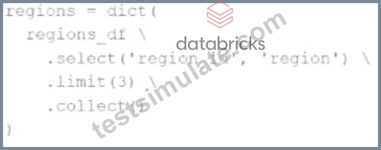
D)
The resulting Python dictionary must contain a mapping ofregion -> region_idfor the smallest
3region_idvalues.
Which code fragment meets the requirements?
- A. regions = dict(
regions_df
.select('region', 'region_id')
.sort(desc('region_id'))
.take(3)
) - B. regions = dict(
regions_df
.select('region_id', 'region')
.limit(3)
.collect()
) - C. regions = dict(
regions_df
.select('region', 'region_id')
.sort('region_id')
.take(3)
) - D. regions = dict(
regions_df
.select('region_id', 'region')
.sort('region_id')
.take(3)
)
Answer: C
Explanation:
Comprehensive and Detailed Explanation From Exact Extract:
The question requires creating a dictionary where keys areregionvalues and values are the correspondingregion_idintegers. Furthermore, it asks to retrieve only the smallest 3region_idvalues.
Key observations:
select('region', 'region_id')puts the column order as expected bydict()- where the first column becomes the key and the second the value.
sort('region_id')ensures sorting in ascending order so the smallest IDs are first.
take(3)retrieves exactly 3 rows.
Wrapping the result indict(...)correctly builds the required Python dictionary:{ 'AFRICA': 0, 'AMERICA': 1,
'ASIA': 2 }.
Incorrect options:
Option B flips the order toregion_idfirst, resulting in a dictionary with integer keys - not what's asked.
Option C uses.limit(3)without sorting, which leads to non-deterministic rows based on partition layout.
Option D sorts in descending order, giving the largest rather than smallestregion_ids.
Hence, Option A meets all the requirements precisely.
NEW QUESTION # 32
A data engineer is asked to build an ingestion pipeline for a set of Parquet files delivered by an upstream team on a nightly basis. The data is stored in a directory structure with a base path of "/path/events/data". The upstream team drops daily data into the underlying subdirectories following the convention year/month/day.
A few examples of the directory structure are:
Which of the following code snippets will read all the data within the directory structure?
- A. df = spark.read.parquet("/path/events/data/*")
- B. df = spark.read.option("recursiveFileLookup", "true").parquet("/path/events/data/")
- C. df = spark.read.option("inferSchema", "true").parquet("/path/events/data/")
- D. df = spark.read.parquet("/path/events/data/")
Answer: B
Explanation:
Comprehensive and Detailed Explanation From Exact Extract:
To read all files recursively within a nested directory structure, Spark requires therecursiveFileLookupoption to be explicitly enabled. According to Databricks official documentation, when dealing with deeply nested Parquet files in a directory tree (as shown in this example), you should set:
df = spark.read.option("recursiveFileLookup", "true").parquet("/path/events/data/") This ensures that Spark searches through all subdirectories under/path/events/data/and reads any Parquet files it finds, regardless of the folder depth.
Option A is incorrect because while it includes an option,inferSchemais irrelevant here and does not enable recursive file reading.
Option C is incorrect because wildcards may not reliably match deep nested structures beyond one directory level.
Option D is incorrect because it will only read files directly within/path/events/data/and not subdirectories like
/2023/01/01.
Databricks documentation reference:
"To read files recursively from nested folders, set therecursiveFileLookupoption to true. This is useful when data is organized in hierarchical folder structures" - Databricks documentation on Parquet files ingestion and options.
NEW QUESTION # 33
The following code fragment results in an error:
Which code fragment should be used instead?
- A.

- B.

- C.

- D.

Answer: C
NEW QUESTION # 34
A data engineer is building a Structured Streaming pipeline and wants the pipeline to recover from failures or intentional shutdowns by continuing where the pipeline left off.
How can this be achieved?
- A. By configuring the optioncheckpointLocationduringwriteStream
- B. By configuring the optioncheckpointLocationduringreadStream
- C. By configuring the optionrecoveryLocationduring the SparkSession initialization
- D. By configuring the optionrecoveryLocationduringwriteStream
Answer: A
Explanation:
Comprehensive and Detailed Explanation From Exact Extract:
To enable a Structured Streaming query to recover from failures or intentional shutdowns, it is essential to specify thecheckpointLocationoption during thewriteStreamoperation. This checkpoint location stores the progress information of the streaming query, allowing it to resume from where it left off.
According to the Databricks documentation:
"You must specify thecheckpointLocationoption before you run a streaming query, as in the following example:
option("checkpointLocation", "/path/to/checkpoint/dir")
toTable("catalog.schema.table")
- Databricks Documentation: Structured Streaming checkpoints
By setting thecheckpointLocationduringwriteStream, Spark can maintain state information and ensure exactly- once processing semantics, which are crucial for reliable streaming applications.
NEW QUESTION # 35
An engineer notices a significant increase in the job execution time during the execution of a Spark job. After some investigation, the engineer decides to check the logs produced by the Executors.
How should the engineer retrieve the Executor logs to diagnose performance issues in the Spark application?
- A. Use the Spark UI to select the stage and view the executor logs directly from the stages tab.
- B. Fetch the logs by running a Spark job with thespark-sqlCLI tool.
- C. Locate the executor logs on the Spark master node, typically under the/tmpdirectory.
- D. Use the commandspark-submitwith the-verboseflag to print the logs to the console.
Answer: A
Explanation:
Comprehensive and Detailed Explanation From Exact Extract:
The Spark UI is the standard and most effective way to inspect executor logs, task time, input size, and shuffles.
From the Databricks documentation:
"You can monitor job execution via the Spark Web UI. It includes detailed logs and metrics, including task- level execution time, shuffle reads/writes, and executor memory usage."
(Source: Databricks Spark Monitoring Guide) Option A is incorrect: logs are not guaranteed to be in/tmp, especially in cloud environments.
B).-verbosehelps during job submission but doesn't give detailed executor logs.
D).spark-sqlis a CLI tool for running queries, not for inspecting logs.
Hence, the correct method is using the Spark UI # Stages tab # Executor logs.
NEW QUESTION # 36
A Spark engineer is troubleshooting a Spark application that has been encountering out-of-memory errors during execution. By reviewing the Spark driver logs, the engineer notices multiple "GC overhead limit exceeded" messages.
Which action should the engineer take to resolve this issue?
- A. Cache large DataFrames to persist them in memory.
- B. Increase the memory allocated to the Spark Driver.
- C. Optimize the data processing logic by repartitioning the DataFrame.
- D. Modify the Spark configuration to disable garbage collection
Answer: B
Explanation:
Comprehensive and Detailed Explanation From Exact Extract:
The message"GC overhead limit exceeded"typically indicates that the JVM is spending too much time in garbage collection with little memory recovery. This suggests that the driver or executor is under-provisioned in memory.
The most effective remedy is to increase the driver memory using:
--driver-memory 4g
This is confirmed in Spark's official troubleshooting documentation:
"If you see a lot ofGC overhead limit exceedederrors in the driver logs, it's a sign that the driver is running out of memory."
-Spark Tuning Guide
Why others are incorrect:
Amay help but does not directly address the driver memory shortage.
Bis not a valid action; GC cannot be disabled.
Dincreases memory usage, worsening the problem.
NEW QUESTION # 37
Which command overwrites an existing JSON file when writing a DataFrame?
- A. df.write.json("path/to/file", overwrite=True)
- B. df.write.format("json").save("path/to/file", mode="overwrite")
- C. df.write.mode("overwrite").json("path/to/file")
- D. df.write.overwrite.json("path/to/file")
Answer: C
Explanation:
The correct way to overwrite an existing file using the DataFrameWriter is:
df.write.mode("overwrite").json("path/to/file")
Option D is also technically valid, but Option A is the most concise and idiomatic PySpark syntax.
Reference:PySpark DataFrameWriter API
NEW QUESTION # 38
A Spark developer is building an app to monitor task performance. They need to track the maximum task processing time per worker node and consolidate it on the driver for analysis.
Which technique should be used?
- A. Use an accumulator to record the maximum time on the driver
- B. Use an RDD action like reduce() to compute the maximum time
- C. Broadcast a variable to share the maximum time among workers
- D. Configure the Spark UI to automatically collect maximum times
Answer: B
Explanation:
Comprehensive and Detailed Explanation From Exact Extract:
The correct way to aggregate information (e.g., max value) from distributed workers back to the driver is using RDD actions such asreduce()oraggregate().
From the documentation:
"To perform global aggregations on distributed data, actions likereduce()are commonly used to collect summaries such as min/max/avg." Accumulators (Option B) do not support max operations directly and are not intended for such analytics.
Broadcast (Option C) is used to send data to workers, not collect from them.
Spark UI (Option D) is a monitoring tool - not an analytics collection interface.
Final Answer: A
NEW QUESTION # 39
A data engineer is working with a large JSON dataset containing order information. The dataset is stored in a distributed file system and needs to be loaded into a Spark DataFrame for analysis. The data engineer wants to ensure that the schema is correctly defined and that the data is read efficiently.
Which approach should the data scientist use to efficiently load the JSON data into a Spark DataFrame with a predefined schema?
- A. Use spark.read.json() with the inferSchema option set to true
- B. Define a StructType schema and use spark.read.schema(predefinedSchema).json() to load the data.
- C. Use spark.read.json() to load the data, then use DataFrame.printSchema() to view the inferred schema, and finally use DataFrame.cast() to modify column types.
- D. Use spark.read.format("json").load() and then use DataFrame.withColumn() to cast each column to the desired data type.
Answer: B
Explanation:
The most efficient and correct approach is to define a schema using StructType and pass it tospark.read.
schema(...).
This avoids schema inference overhead and ensures proper data types are enforced during read.
Example:
frompyspark.sql.typesimportStructType, StructField, StringType, DoubleType schema = StructType([ StructField("order_id", StringType(),True), StructField("amount", DoubleType(),True),
])
df = spark.read.schema(schema).json("path/to/json")
- Source:Databricks Guide - Read JSON with predefined schema
NEW QUESTION # 40
What is the difference betweendf.cache()anddf.persist()in Spark DataFrame?
- A. Both functions perform the same operation. Thepersist()function provides improved performance asits default storage level isDISK_ONLY.
- B. Bothcache()andpersist()can be used to set the default storage level (MEMORY_AND_DISK_SER)
- C. cache()- Persists the DataFrame with the default storage level (MEMORY_AND_DISK) andpersist()- Can be used to set different storage levels to persist the contents of the DataFrame
- D. persist()- Persists the DataFrame with the default storage level (MEMORY_AND_DISK_SER) andcache()- Can be used to set different storage levels to persist the contents of the DataFrame.
Answer: C
Explanation:
Comprehensive and Detailed Explanation From Exact Extract:
df.cache()is shorthand fordf.persist(StorageLevel.MEMORY_AND_DISK)
df.persist()allows specifying any storage level such asMEMORY_ONLY,DISK_ONLY, MEMORY_AND_DISK_SER, etc.
By default,persist()usesMEMORY_AND_DISK, unless specified otherwise.
Reference:Spark Programming Guide - Caching and Persistence
NEW QUESTION # 41
An engineer has two DataFrames: df1 (small) and df2 (large). A broadcast join is used:
python
CopyEdit
frompyspark.sql.functionsimportbroadcast
result = df2.join(broadcast(df1), on='id', how='inner')
What is the purpose of using broadcast() in this scenario?
Options:
- A. It increases the partition size for df1 and df2.
- B. It reduces the number of shuffle operations by replicating the smaller DataFrame to all nodes.
- C. It ensures that the join happens only when the id values are identical.
- D. It filters the id values before performing the join.
Answer: B
Explanation:
broadcast(df1) tells Spark to send the small DataFrame (df1) to all worker nodes.
This eliminates the need for shuffling df1 during the join.
Broadcast joins are optimized for scenarios with one large and one small table.
Reference:Spark SQL Performance Tuning Guide - Broadcast Joins
NEW QUESTION # 42
A data engineer observes that an upstream streaming source sends duplicate records, where duplicates share the same key and have at most a 30-minute difference inevent_timestamp. The engineer adds:
dropDuplicatesWithinWatermark("event_timestamp", "30 minutes")
What is the result?
- A. It is not able to handle deduplication in this scenario
- B. It accepts watermarks in seconds and the code results in an error
- C. It removes duplicates that arrive within the 30-minute window specified by the watermark
- D. It removes all duplicates regardless of when they arrive
Answer: C
Explanation:
Comprehensive and Detailed Explanation From Exact Extract:
The methoddropDuplicatesWithinWatermark()in Structured Streaming drops duplicate records based on a specified column and watermark window. The watermark defines the threshold for how late data is considered valid.
From the Spark documentation:
"dropDuplicatesWithinWatermark removes duplicates that occur within the event-time watermark window." In this case, Spark will retain the first occurrence and drop subsequent records within the 30-minute watermark window.
Final Answer: B
NEW QUESTION # 43
A Spark engineer must select an appropriate deployment mode for the Spark jobs.
What is the benefit of using cluster mode in Apache Spark™?
- A. In cluster mode, the driver program runs on one of the worker nodes, allowing the application to fully utilize the distributed resources of the cluster.
- B. In cluster mode, the driver is responsible for executing all tasks locally without distributing them across the worker nodes.
- C. In cluster mode, the driver runs on the client machine, which can limit the application's ability to handle large datasets efficiently.
- D. In cluster mode, resources are allocated from a resource manager on the cluster, enabling better performance and scalability for large jobs
Answer: A
Explanation:
Comprehensive and Detailed Explanation From Exact Extract:
In Apache Spark's cluster mode:
"The driver program runs on the cluster's worker node instead of the client's local machine. This allows the driver to be close to the data and other executors, reducing network overhead and improving fault tolerance for production jobs." (Source: Apache Spark documentation -Cluster Mode Overview) This deployment is ideal for production environments where the job is submitted from a gateway node, and Spark manages the driver lifecycle on the cluster itself.
Option A is partially true but less specific than D.
Option B is incorrect: the driver never executes all tasks; executors handle distributed tasks.
Option C describes client mode, not cluster mode.
NEW QUESTION # 44
......
Get Prepared for Your Associate-Developer-Apache-Spark-3.5 Exam With Actual 85 Questions: https://www.validvce.com/Associate-Developer-Apache-Spark-3.5-exam-collection.html
Valid Associate-Developer-Apache-Spark-3.5 Test Answers Full-length Practice Certification Exams: https://drive.google.com/open?id=1SLBOUOdXs6QLHUtjvgcS6VMih7inHcnG
