

Verified MO-100 Exam Dumps PDF [2021] Access using ValidVCE
Try Best MO-100 Exam Questions from Training Expert ValidVCE
Understanding functional and technical aspects of Manage tables and lists (15-20%)
The following will be discussed in MO-100 dumps
- Create tables
- Sort table data
- Create and modify lists
- Define custom bullet characters and number formats
- Restart and continue list numbering
- Configure a repeating row header
- Convert tables to text
- Set starting number values
- Create tables by specifying rows and columns
- Increase and decrease list levels
- Convert text to tables
- Format paragraphs as numbered and bulleted lists
- Modify tables
- Resize tables, rows, and columns
- Split tables
- Change bullet characters and number formats
- Configure cell margins and spacing
- Merge and split cells
Understanding functional and technical aspects of Manage documents (20-25%)
The following will be discussed in MO-100 dumps
- Apply style sets
- Inspect documents for issues
- Locate and correct accessibility issues
- Modify basic document properties
- Share documents electronically
- Navigate within documents
- Save documents in alternative file formats
- Link to locations within documents
- Show and hide formatting symbols and hidden text
- Format documents
- Locate and correct compatibility issues
- Insert and modify headers and footers
- Save and share documents
- Locate and remove hidden properties and personal information
- Configure page background elements
- Search for text
- Move to specific locations and objects in documents
- Modify print settings
- Set up document pages
NEW QUESTION 11
In the ''Making moments last forever1'' section, convert the five paragraphs starting with ''Corporate events'' to a bulleted list.
Answer:
Explanation:
Select the text you want to change into a list.
Go to Home> Bullets or Home> Numbering.
NEW QUESTION 12
You work for Fourth Coffee. You are finalizing a training manual for employees who will bake muffins for the coffee shop.
Display the Integral header on all pages of the documents except page 1.
Answer:
Explanation:
Step 1: Click the "Insert" tab from the Ribbon;
Step 2: Click the "Header" (or "Footer") command from the "Header&Footer" section;
Step 3: Select one style from the drop-down list (e.g., the Austin style);
Step 4: In the "Design" tab (or Header & Footer tab if Microsoft 365) from the ribbon, check the "Different First Page" command;
Now the header or footer on the first page is different from all other pages. You can delete the contents and formatting in the header or footer on the first page if you want to leave it empty.
NEW QUESTION 13
In the " Manufacturing Process" section, assign the alt text description "Process flow" to the SmartArt graphic, (Be sure to select the entire SmartArt graphic.)
Answer:
Explanation:
To add alt text in Word, open your document and select the object to which you want to add the alternative text.
NEW QUESTION 14
In the ''Event Package'' section, insert a footnote to the right of the heading. Enter the footnote text ''Includes digital files.''
Answer:
Explanation:
Click where you want to reference to the footnote or endnote.
On the References tab, select Insert Footnote or Insert Endnote.
Enter what you want in the footnote or endnote.
Return to your place in the document by double-clicking the number or symbol at the beginning of the note.
NEW QUESTION 15
SIMULATION
Project 4 of 7: Member
Overview
You are preparing a letter to museum members announcing a new exhibit and urging them to renew their membership.
Apply a Bright Green text highlight to the text string "And you get to see it first!".
Answer:
Explanation:
See the explanation below.
Explanation:
1. Select the text strung "And you get to see it first!".
2. Click the arrow next to Text Highlight Color from the Home tab.
3. Click on the Bright Green color.
References:
https://support.office.com/en-us/article/Apply-or-remove-highlighting-1747d808-6db7-4d49-86ac-1f0c3cc87e2e
NEW QUESTION 16
SIMULATION
Project 1 of 7: Observation
Overview
You are a member of the Barstow College Observation Project committee. You are preparing the initial summary report for this year's count, but have not received all of the data you need to complete the report.
Introduction
The multi-departmental Wildlife Observation Project has completed its wildlife population counts for this year.
The counts were made between May 5 and May 7 for both the wilderness and cultivated land areas. This is in line with the count periods for all previous years. The species used for the counts have been identified as common for the region (central Missouri) in which the counts were taken. (Author, 2009) As in previous years, five observation blinds were set up two weeks before the counts were to take place.
Counters worked eight-hour shifts providing 24-hour coverage of the count areas for two days. Weather for both observation days was clear and mild (varying between 50-70 degrees F).
The results presented here are summary total results only, which counts from five and ten years ago provided for comparison. Detailed observation results will be available as soon as they are completed. We estimate that they will be available some time in the next two weeks.
Wilderness Summary
The wilderness observation area is a five-acre section of unimproved forest land. The most common trees in the area are maple, red oak, cedar, sweet gum, and hickory. The area also includes a small spring. The area is not enclosed by a fence or other man-made barrier.
The area is located eight miles from the nearest paved road and twelve miles from the nearest residence. Off- road vehicles were used to bring counters close to, but not entering, the count area. The nearest approach by off-road vehicles was one mile.
The table below lists the summary counts.
Though further research any analysis is needed, the drop in mourning dove and bobwhite quail counts could be significant. The detailed count data shows these numbers failing off each year.
Cultivated Land Summary
The cultivated land observation area is a five-acre section of cultivated land near the center of a 50-acre field.
The field is used to grow corn, wheat, soybeans, and clover, with the crop rotated annually. In the fifth year of the cycle, the field is left fallow.
The area is located two miles from the nearest paved road and one mile from the nearest residence. A storage barn is located at the southern border of the field.
The table below lists the summary counts.
Additional Notes
This project was initially scheduled to run for ten years, so we are currently in our last year. The committee needs to decide if it is worth the time and expense to continue the project. The landowners have experience that they would be happy to let us continue. Costs relating to the project is minimal and it does provide an opportunity to offer extra credit to students volunteering as counters.
A suggestion has been made by some committee members that we should increase the count frequency, counting on a quarterly schedule instead of an annual schedule. This would need to be coordinated with the owner of the cultivated field so that we do not interfere with planting or harvesting schedules.
Special Thanks
Once again, we would like to offer special thanks to:
We couldn't do this without you.
Add a table with eight rows and four columns in the "Cultivated Land Summary" section, below the text "The table below lists the summary counts."
Answer:
Explanation:
See the explanation below.
Explanation:
1. Click below the text "The table below lists the summary counts." where the table should be inserted.
2. Select Table from the Insert tab.
3. Drag through the grid to set eight rows and four columns (4x8 Table) as desired OR
1. Click below the text "The table below lists the summary counts." where the table should be inserted.
2. Select Table from the Insert tab.
3. Select Insert Table from the options provided below and type four columns and eight rows in the appropriate boxes, then select OK.
References:
https://support.office.com/en-us/article/Insert-a-table-A138F745-73EF-4879-B99A-2F3D38BE612A
NEW QUESTION 17
You work for Woodgrove Bank. You are preparing a brochure that explains U.S bank account options for international student.
Find the word ''automatic'' and delete it from the document.
Answer:
Explanation:
Use Ctrl+F key to and find word "automatic" Once find and highlighted, delete it by using delete key.
NEW QUESTION 18
SIMULATION
Project 2 of 7: Bakery Letter
Overview
As the marketing manager for Liberty's Delightful Sinful Bakery and Café, you want to inform local businesses that you will now be providing catering services.
December 31, 2018
CATERING SERVICES ARE NOW AVAILABLE
Dear Business Owner:
Liberty's Delightful Sinful Bakery and Café would like to inform you that beginning next month, we will be providing catering and delivery services in your area. We invite you to look over our lunch catering menu below, and contact us to schedule your next business meeting lunch.
The menu above is a small sample of the options we have available. Liberty's Delightful Sinful Bakery will impress you with excellent service and great food at an affordable price.
We look forward to hearing from you to cater your next meeting.
Sincerely,
Steve Lasker
Owner
Apply table style Grid Table 4 - Accent 1 to the table in the document.
Answer:
Explanation:
See the explanation below.
Explanation:
1. Select the table, then the Table Tools will appear above.
2. Select the Grid Table 4 - Accent 1 style as desired under the Design tab in the Table Tools menu.
References:
https://support.office.com/en-us/article/Apply-table-styles-0F19E350-F9A1-4A9F-AFDB-46EE2BB8460C
NEW QUESTION 19
In the " Description" section, use the 3D Models feature to insert the PillPack model from the 3D objects folder into the blank paragraph.
Position the model in Line with Text.
Answer:
Explanation:
On the Insert tab, in the Illustrations group, click 3D Models > From a File.
Navigate to where your 3D object is, select it and click Insert.
NEW QUESTION 20
Accept all tracked insertion and deletions, Reject all formatting changes.
Answer:
Explanation:
Make sure the Review tab of the ribbon is displayed.
Click the Show Markup tool (in the Tracking group). ...
Clear all the checkmarks, except the Formatting checkmark. ...
Click the down-arrow under the Accept tool (in the Changes group). ...
Choose Accept All Changes Shown.
NEW QUESTION 21
In the blank paragraph after the document title, insert a table of contents. Use the Automatic Table 1 style.
Answer:
Explanation:
* References * TABLE OF CONTENTS * TC option * Automatic Table 1
NEW QUESTION 22
SIMULATION
Project 7 of 7: Coffee
Overview
You are preparing a flyer for use at a commercial foods trade show. You are editing the document in response to client requests.
Apply the Soft Round Bevel picture effect to the image of a coffee cup on a saucer.
Answer:
Explanation:
See the explanation below.
Explanation:
1. Select the image of the coffee cup on a saucer which you want to add the effect to.
2. Click Picture Effects from the Picture Styles group in the Format tab under the Picture Tools.
3. Render the cursor over the Bevel option from the Picture Effects options, then select the Soft Round option.
References:
https://support.office.com/en-us/article/Add-or-change-an-effect-for-a-picture-D9F0F1F2-5227-450F-95B4-
25FFDDDBD965
25FFDDDBD965
NEW QUESTION 23
Set the line spacing to 1.4 lines for the entire document.
Answer:
Explanation:
Select the paragraphs you want to change.
Go to Home > Line and Paragraph Spacing.
Choose the number of line spaces you want or select Line Spacing Options, and then select the options you want under Spacing.
Topic 4, Southridge Video

NEW QUESTION 24
In the ''Top Sellers'' section, continue the numbering of the list at the top of the second column, so the list items are numbered from 1 through 6.
Answer:
Explanation:
Select the second column and insert number
NEW QUESTION 25
In the "Savings Accounts" section, delete the comment that is attached to the text "$3,000".
Answer:
Explanation:
Click the Review tab.
Click the Next Comment or Previous Comment button to locate the offending comment. Upon success, the comment is highlighted in the markup area.
In the Comments area, choose Delete →Delete. ...
Repeat Steps 2 and 3 to remove additional comments.
Topic 6, Contoso Pharmaceuticals
Purpose
Conreleve is a new analgesic (pain reliever). Clinical trials show people tolerate this medicine an final from their pain. In 95% of people, Conreleve worked better than a placebo. (ClinicalTrail1) 3% of people reported side effects when taking Conreleve. Side effects Included nausea, bruising, and dizziness, (ClinicalTrail1) History Researchers at Contoso Pharmaceutical created the active ingredient In Conreleve four years ago, Contoso Pharmaceuticals began clinical trails years ago, Six months ago, the government approved the use and sale of Conreleve.
Description
The medicine is packaged in a turquoise and white capsule.
We use the standard capsule size #1, It weight 75 mg and is 16.61 mm long. This capsule size holds to 400 mg of material.
For the inner packaging, we use a standard blister pack with an aluminum backing.
For the outer packaging, we use a standard cardboard box.
Manufacturing
We expect to being manufacturing the Conreleve capsules in January of next year. We expect to produce an initial batch of one million units over three months. We expect to have Conreleve in stores by April of next year.
Fill Material
The fill material for the conreleve capsule is weighed, then sifted and blended together. The fill material includes both active and inactive ingredients, as shown in the next table. After the fill material is blended, It is inspected for quality control before being encapsulated.
Capsule Material
The capsule material itself is also weighed, shifted, and blended. Capsule material is also melted, formed, and dried. It is then inspected for quality control before encapsulating the fill material.
Manufacturing Process
Marketing
The Contoso Pharmaceutical marketing team is finalizing its marketing plans. The team will update this documents when the plan is complete.
Advertising
The marketing team created an advertising campaign target at radio. Expect to hear advertisements during the evening commute on radio stations. The marketing team chose radio stations that appeals to women ages 44-55.
The marketing team is finalizing its plans for an attend the medical conference in July.
Distribution
The Contoso Pharmaceutical distribution plans to sell Conreleve at all major drug stores an grocery stores. The distribution team is finalizing plans to offer samples of Conreleve at all public hospitals that have at least 500 beds.
NEW QUESTION 26
SIMULATION
Project 3 of 7: Service
Overview
You are an administrative assistant for Fabrikam, Inc.'s Field Service division. You are preparing the monthly newsletter to be sent out to field service engineers.
Remember that mileage reimbursement claims must be submitted by the 15th of each month. Save the mileage form as a PDF file and email it to your regional supervisor.
Bonuses are Changing
New Depot Return Process
All offices have received the new tracking form for repair depot returns. Complete the following tasks when returning parts for repair:
Complete all fields in the Field Service section of the form.
Remove the top copy and file it in your office.
Securely attach the form to the part.
Package the part for shipment.
Ship to the home office and clearly label the box "For depot return".
All returns must be shipped to the home office to receive credit. The regional depots will close in two months and will not be accepting return shipments.
Vice President's Corner
NOTE TO SELF: If the VP doesn't provide content by Wednesday, delete this section and put in something generic about customer satisfaction.
Quarterly Results
NOTE TO SELF: This is a placeholder charter. Update the chart after the actual results are available on Monday.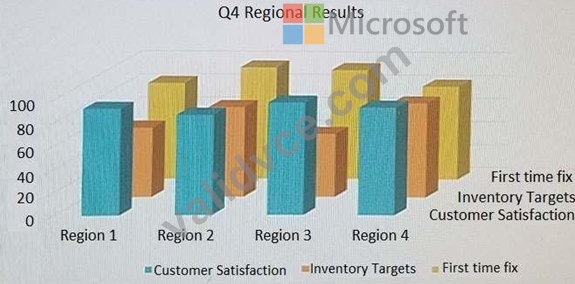
Add a Grid cover page.
Answer:
Explanation:
See the explanation below.
Explanation:
1. Select Cover Page, from the Pages group on the Insert tab.
2. Select the grid cover page from the gallery of options.
References:
https://www.bing.com/search?q=microsoft%20word%202016%20grid%20cover%
20page&qs=n&form=QBRE&sp=-1&pq=microsoft%20word%202016%20grid%20cover%20page&sc=1-
35&sk=&cvid=4E8A362581D144B1AE8D42A91AD951F3
NEW QUESTION 27
......
MO-100 Exam topics
Candidates must know the EPM topics before they start of preparation because it will really help them solving the problems. Our MO-100 practice test and MO-100 practice exams will include the following topics. These are covered in our MO-100 dumps.
Latest 100% Passing Guarantee - Brilliant MO-100 Exam Questions PDF: https://www.validvce.com/MO-100-exam-collection.html
